
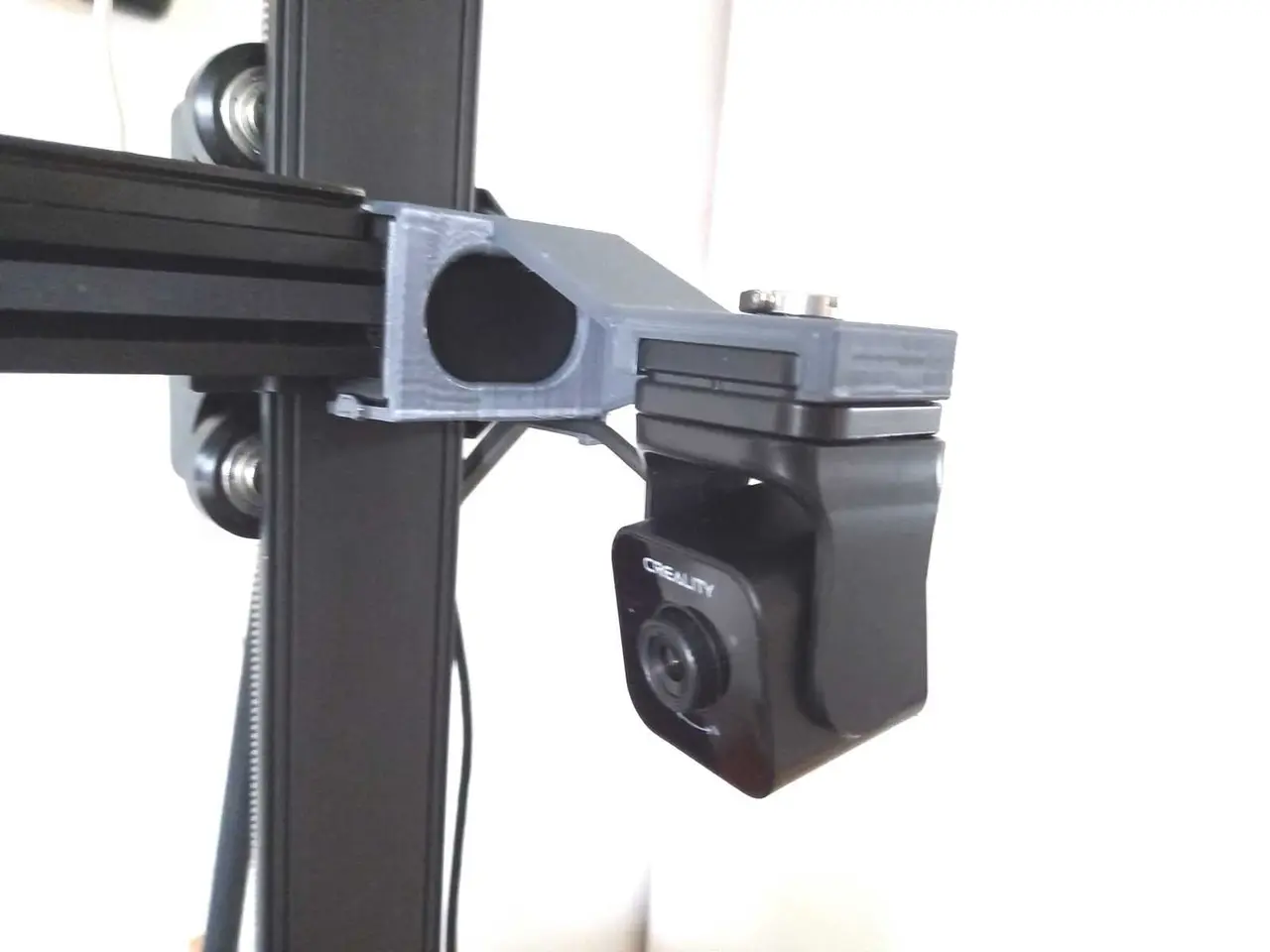
Creality Nebula Camera Holder for Ender-3 V3 KE(/SE) (Customizable & Supportless)
por Henk de Vlaam en Thingiverse
The design history of this part can be found at the end of chapter 'How I Designed This'. Description This holder is intended for the Nebula camera and is attached to the end of the Z-bridge of the Ender-3 V3 KE. Of course, it can also be used on the SE that has been upgraded with the Creality...
Licencia
Solo uso personalCC BY-NC-SA 4.0 — Atribución, no comercial, compartir igual
Uso personal dando crédito; sin fines comerciales y las modificaciones con la misma licencia.
Al descargar aceptas respetar la licencia y dar crédito a Henk de Vlaam.
- Categoría
- Para tu impresora
- Formatos
- STL
- Descargas (todas las plataformas)
- 7,406
- Publicado
También en
Sobre este modelo
The design history of this part can be found at the end of chapter 'How I Designed This'. Description This holder is intended for the Nebula camera and is attached to the end of the Z-bridge of the Ender-3 V3 KE. Of course, it can also be used on the SE that has been upgraded with the Creality Nebula Smart Kit. As with all my Ender-3 V3 accessories, installation is done without additional tools and without modification of the printer. When using the standard model, the camera lens is located 25 mm above the Nozzle tip and 30 mm before the X-axis. This makes the nozzle tip just visible and provides a reasonable view of the entire print bed. The holder is also equipped with a cable guide/strain relief. This guides the camera cable backwards because it transfers the pulling force of the cable to below the attachment point and because the cable must be kept clear of the display and the Tool holder which is clamped at the bottom of the right leg of the gantry. Special is that you can change the model as desired in terms of the above position dimensions - see the picture with the customized model. This also applies to whether or not the tripod screw hole is printed. For this I would like to refer to the chapter 'How I Designed This'. NOTE 1: There appear to be KE printers with too little space - smaller than 1.3 mm - for the lug next to the linear rail. I would like to point the owners of those to remix https://www.thingiverse.com/thing:6774401. NOTE 2: If you are interested in more Ender-3 V3 KE/SE mods, see https://www.thingiverse.com/hapedevee/collections/42550389/things. Assembly instructions (see also the numbered photos): 1) The camera is used upside down. Therefore, it must first be rotated 180 degrees while turning the lens to the bottom of the U-frame around the pivot points (photo 1). 2) The camera can now be slid into the holder. The fit depends on the shrinkage compensation set. That is why, just to be safe, a hole for a 1/4 inch tripod screw is provided (photo '1-3'). 3) Guide the camera cable with a wide bend to the cable guide and press it into it (photo '1-3'). 4) Press the holder onto the plastic end piece of the Z-bridge. First place the holder on the right around the adjustment screw (photo 4a) and then turn clockwise so that the 2 lugs click behind the plastic part of the Z-bridge (photo 4b shows the rotation). The holder is now not wall-fixed, but it is reasonably anchored. 5) Connect the cable to the display. To make the plug less vulnerable I bought a 90 degree male to female USB adapter.
Descripción original del autor, publicada en Thingiverse.



