
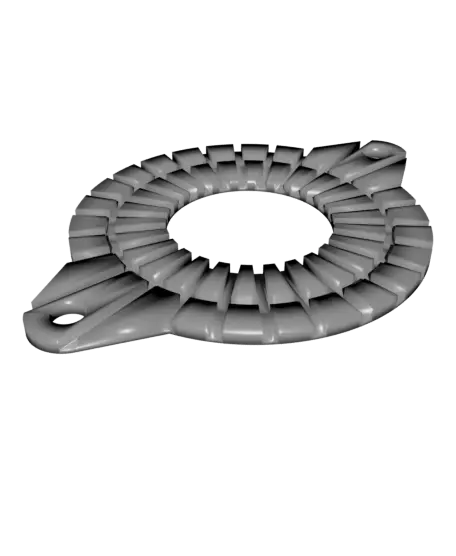
Creality K1 Extruder motor heat shield with air vents
por BuckyBrains en Thangs
Most of the Creality K1 printers (first batch I suppose) are facing the dreaded UNDER EXTRUSION problem. I too faced the same.
Thangs entrega los archivos a usuarios con cuenta gratuita
Licencia
Solo uso personalSin licencia indicada
El autor no indicó una licencia: todos los derechos le pertenecen. Úsalo solo para imprimir en casa y consulta al autor para cualquier otro uso.
Al descargar aceptas respetar la licencia y dar crédito a BuckyBrains.
Archivos (2)
- K1 - ExtruderHeatShieldVented.step STEP · 327 KB
- K1 - ExtruderHeatShieldVented.stl STL · 198 KB
- Categoría
- Para tu impresora
- Formatos
- STEP, STL
- Descargas
- 470
- Publicado
Sobre este modelo
Most of the Creality K1 printers (first batch I suppose) are facing the dreaded UNDER EXTRUSION problem. I too faced the same.
After lots of tinkering I found out that the extruder motor is getting too hot while printing. Which in turn heats up the pressure plate of the moving extruder gear and deforms due to the filament pressure between the gears.
Solution to the problem is first you need to reduce the current (to 0.4 to 0.45 amps) of the motor by getting the root access. Then you need to print this thin barrier out of some high temp. material like ASA/ABS etc. I printed it with PETG as I didn't have any ASA/ABS in stock. So far It's working fine (after reducing current).
But if you don't have root access then you must print using high temp. material. You may need to clean the part with a soft wire brush if too much stringing is there.
Note: Keep the vents towards the motor while installing. This will reduce the contact area with the motor.
This model is 1.4mm thick. So you'll have to replace the screws to fit in.
Recommended Print settings - Material - PETG - Supports - None - Layer height - 0.1mm - Infill - 15% - Bottom layers - 4 or more
Please support me at Paypal (https://www.paypal.com/paypalme/kaushikbm) or Buymeacoffee (https://buymeacoffee.com/kaushikbm) for more free models :)
Descripción original del autor, publicada en Thangs.



