
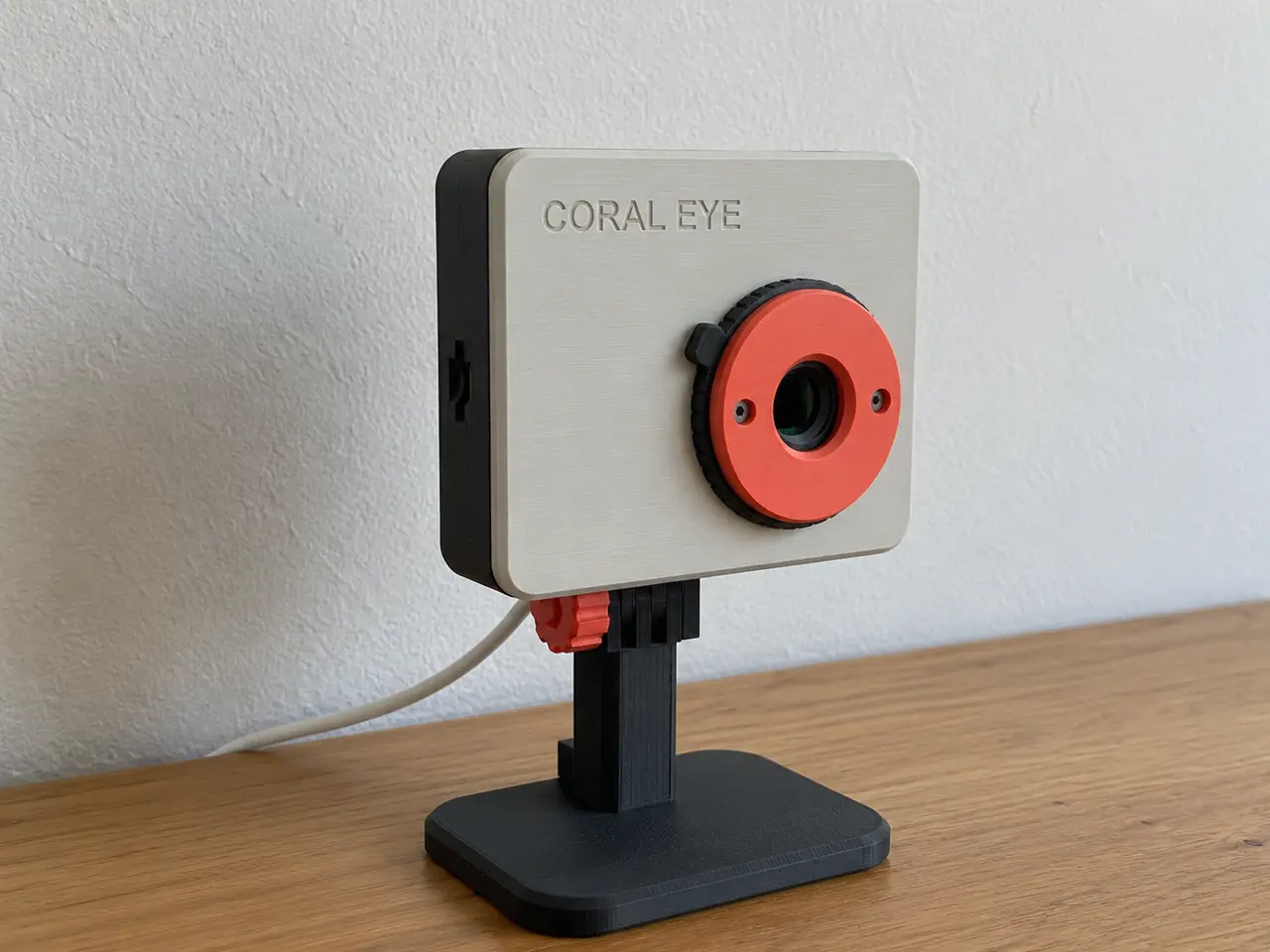
Coral Eye – AI Camera Case with a Twist Privacy Shutter for the Coralboard SL
por Mario Castelló Villar en Printables
Turns the Coralboard SL and its kit camera into a compact AI camera with a twist privacy shutter. Mount it everywhere.
Licencia
Revisa las condicionesEl autor usa su propia licencia. Revisa sus condiciones en la página original antes de compartir, modificar o vender.
Al descargar aceptas respetar la licencia y dar crédito a Mario Castelló Villar.
Archivos (51)
- CoralEye_LensRing_Lite.step STEP · 24 KB
- CoralEye_Mount_Magnet.step STEP · 58 KB
- CoralEye_Mount_Wall.step STEP · 55 KB
- CoralEye_Mount_Wall.stl STL · 92 KB
- CoralEye_Mount_Magnet.stl STL · 83 KB
- CoralEye_Mount_Tripod.step STEP · 209 KB
- CoralEye_Mount_GoPro.step STEP · 210 KB
- CoralEye_Plate2_Mounts.3mf 3MF · 113 KB
- CoralEye_PrivacyCap.step STEP · 63 KB
- CoralEye_Stand.stl STL · 161 KB
- CoralEye_Mount_Tripod.stl STL · 94 KB
- CoralEye_LensRing_Lite.stl STL · 142 KB
- CoralEye_Mount_GoPro.stl STL · 108 KB
- CoralEye_Shutter_Bezel.step STEP · 116 KB
- CoralEye_Stand.step STEP · 246 KB
- CoralEye_Shutter_Blade_Lower.stl STL · 51 KB
- CoralEye_Stand_Knob.stl STL · 138 KB
- CoralEye_Shutter_Blade_Upper.stl STL · 51 KB
- CoralEye_UserButton.step STEP · 12 KB
- CoralEye_Shutter_Blade_Lower.step STEP · 45 KB
- CoralEye_Shutter_Blade_Upper.step STEP · 42 KB
- CoralEye_PrivacyCap.stl STL · 124 KB
- CoralEye_Face_open-LEDs.stl STL · 411 KB
- CoralEye_Face_Wordmark-Inlay.stl STL · 216 KB
- CoralEye_Shutter_Bezel.stl STL · 276 KB
- CoralEye_Shutter_TwistRing.stl STL · 796 KB
- CoralEye_UserButton.stl STL · 443 KB
- CoralEye_Stand_Knob.step STEP · 178 KB
- CoralEye_Face.step STEP · 789 KB
- CoralEye_Face_hidden-LEDs.stl STL · 411 KB
- CoralEye_Body.stl STL · 1022 KB
- CoralEye_Plate1_Case.3mf 3MF · 739 KB
- CoralEye_Body.step STEP · 2,5 MB
- CoralEye_Shutter_TwistRing.step STEP · 4,1 MB
- render.py PY · 13 KB
- export_3mf.py PY · 3 KB
- render_lineup.py PY · 2 KB
- accessories.py PY · 15 KB
- render_colours.py PY · 2 KB
- render_gallery.py PY · 5 KB
- check_mounts.py PY · 2 KB
- cutaway.py PY · 2 KB
- coral_eye.py PY · 26 KB
- render_infographic.py PY · 3 KB
- privacy_cap.py PY · 3 KB
- check_print.py PY · 6 KB
- render_shutter.py PY · 3 KB
- check_shutter.py PY · 4 KB
- check_fit.py PY · 2 KB
- render_views.py PY · 5 KB
- shutter.py PY · 16 KB
- Categoría
- Tecnología
- Formatos
- STEP, STL, 3MF, PY
- Descargas
- 2
- Publicado
Sobre este modelo
The Coralboard is built for vision that stays on the device. In practice that means a camera on a short ribbon cable next to a bare board. Coral Eye puts both into one small body that looks and handles like a camera. Point it at a desk, a doorway, a shelf or a workbench, and no frame ever has to leave the board. When you want privacy, you don't have to trust software: turn the ring and the lens is physically covered.
Important to read:
- Twist privacy shutter. Turn the knurled ring 60° and two blades slide shut over the lens with a click. Their tips meet in a 45° scarf joint, so no light gets through. End stops and detents at both ends. A thumb lug makes it easy to turn, and the blades are coral, so a closed shutter is obvious at a glance. Two M2 screws hold the module, no glue. - Built on Google's reference CAD. No part collides with any of the 176 solids of the official Coralboard SL STEP, the camera module or its flex cable. The shutter was checked over its whole travel: no collisions, no light leaks when closed, and nothing in the camera's field of view when open. - The kit's camera and cable, as they come. The OV5647 module screws onto four posts behind the shutter. Its short flex cable (about 55 mm) leaves the camera downwards, makes one U-turn and runs behind it into the CSI socket. That is the same single fold as in Google's own sensor-HAT assembly, so the contacts face the right way. - One rail, five mounts. Mounts slide up a dovetail on the back. The GoPro and tripod adapters click in with a flexible latch that holds even with the dovetail's full play. The wall and magnet plates carry the camera's weight. The desk stand takes the GoPro adapter. - A desk stand with a GoPro-style tilt joint (-35° to +45°, stable at every angle). - A GoPro adapter that fits any GoPro mount: clamps, suction cups and monitor clips. - A 1/4"-20 tripod adapter that keeps the camera upright. - A wall plate. - A magnet plate for a fridge, a metal shelf or a PC case. - Every port stays usable. USB-C has an opening that admits cable overmolds. One wide bay takes USB-A plugs up to about 10 mm thick and the Qwiic connector. The microSD slot has a finger scoop, and I2S2 and the battery connector (JST-PH) have lead-in chamfers. A captured printed button reaches USER; RESET sits behind a pinhole, so the board can't be reset by accident. - A status light that disappears. One light pipe gathers the board's three LEDs behind a 0.4 mm skin. It is invisible when off and glows through white or natural filament when on. An open-window face is included for dark colours. - Passive cooling. The port bay and the bottom vent let air in, and the top vents let it out, like a chimney. No fan. - No supports, anywhere. Every part comes in its print orientation, plus two ready-to-slice 3MF plates and a two-colour wordmark inlay for MMU printers. - Parametric source. The build123d (Python) scripts are included, with every dimension named and every check script used to verify the design.
Qhat you need to build it: - Synaptics Coralboard SL (the stick-on rubber feet can stay). - The kit's Arducam OV5647 camera and its 15-to-22-pin flex cable (about 55 mm). Other cables must be 50 to 60 mm long and of the same type. - 4 × M3 × 10 mm button-head screws (ISO 7380). M3 × 12 also works; don't go longer. They self-tap into the face. - 4 × M1.6 screws for the camera: the ones that come with the kit, or M2 × 4 self-tapping. - 2 × M2 × 6 mm button-head hex screws (ISO 7380) for the shutter. They self-tap into the face. Don't go longer than M2 × 8. - Desk stand: it holds the camera through the GoPro adapter, with 1 × M5 × 20 mm hex bolt and 1 × M5 hex nut, or a GoPro thumbscrew. - Tripod adapter: 1 × 1/4"-20 hex nut (7/16"), slid in from the side. - Wall plate: 2 countersunk wood screws, 3.5 to 4 mm. - Magnet plate: 4 × neodymium disc magnets, 10 × 3 mm (a drop of glue keeps them in while the plate is off the camera).
Settings: - Material: PLA or PETG, but the twist ring must be PETG: its click beams flex every time you turn it, too often for PLA. Use PETG for the GoPro and tripod adapters too (their latch tabs flex), and for the body if the board will run heavy NPU workloads in a warm room. - Layer height 0.2 mm (the shutter's heights are whole 0.2 mm layers) · Perimeters 3 · Infill 15 % gyroid · Supports none · Nozzle 0.4 mm. - Orientation: keep the one in the files. Body back-down, face front-down (its first layer is the visible surface), shutter bezel and twist ring front-down, blades with their pins up. The GoPro adapter prints upside down and the tripod adapter upright, so each latch tab grows from its root. - Colours: shutter bezel and blades in a contrasting colour (coral in the pictures), twist ring in any colour. For the hidden status light, print the face in white, natural or another light filament; for a dark face use Face_open-LEDs. - Brim: recommended for the GoPro adapter (tall and narrow). - Bridges: the mount rail in the back of the body is a 20 mm bridge; your slicer's default bridge settings are fine. - First layer: keep elephant-foot compensation on (PrusaSlicer's default). The twist ring's 0.8 mm slots and the face's eye, where the shutter's sleeve turns, both start on the first layer. - Two-colour wordmark: load Face_hidden-LEDs and Face_Wordmark-Inlay together as one object with two parts and give the inlay another filament.
Build it: 1. Drop the printed USER button into its hole in the bottom wall, from the inside. 2. Build the shutter in the closed position. Lay the bezel face-down and drop the blades into its channel, pins up, with their tips touching in the middle. The blade with the wider stem goes into the wider slot. Lay the twist ring on top, grooves down, and turn it until it drops flat onto the bezel with both pins in its grooves. 3. Plug the flex cable into the camera, then screw the camera onto the four posts inside the face with the M1.6 screws, connector edge towards the bottom of the face. 4. Hold the shutter stack together and place it on the front of the face: the short sleeve under the twist ring drops into the face's eye and centres it. Drive the two M2 × 6 screws until their heads sit on the bosses. The bosses set the twist ring's play, so it turns freely however tight the screws are. Turn it once each way: it clicks just before each end. 5. Drop the Coralboard into the body, USB ports towards the bottom openings. 6. Stand the face on the body's bottom edge, opened like a book by no more than about 45°, and plug the other end of the flex into the CSI socket, between the two mikroBUS headers. The contacts face up (away from the board), as in Google's guide. The cable leaves the camera downwards, U-turns and runs up behind it. The kit's cable is short, so opening the face wider pulls on it. 7. Close the face (its lips locate it) and drive the four M3 screws in from the back. 8. Mount the camera: - GoPro or tripod adapter: slide it into the rail from below until it clicks. Pull it down firmly to take it off. - Wall or magnet plate: screw the wall plate to the wall, or press the magnets into the magnet plate's pockets (the side with the tongue) and stick it to steel. Plug the cables into the camera, then lower the camera onto the plate from above. - Desk stand: slide the GoPro adapter onto the camera, then join it to the stand's three fingers with the M5 bolt. The M5 nut goes into the hex pocket and the bolt head into the knob.
notes: - The mikroBUS sensor HAT from the Google I/O kit is not used: the camera mounts directly behind the shutter. - Wi-Fi: with the M.2 card fitted, stick its flexible antennas inside the top wall. - microSD: push the card in and out with a fingernail or the tip of a pen. - Qwiic: the socket sits deep in the port bay; push the plug in by its wires or with tweezers. - Tripod: the screw sits about 21 mm behind the USB plugs, so tripod heads up to about 40 mm across stay clear of them. On larger plates, use right-angle cables. - Lens position: taken from the Raspberry Pi Camera drawing and Google's kit photos. The shutter leaves the full field of view of the kit's standard lens clear even if the lens sits 1 mm off. Very wide-angle lenses may see the edge of the bezel. - Lite option: if you prefer no moving parts, the plain lens ring (LensRing_Lite) is glued flat onto the face, and the press-in PrivacyCap covers it. The cap also centres the ring while the glue sets.
Descripción original del autor, publicada en Printables.



