
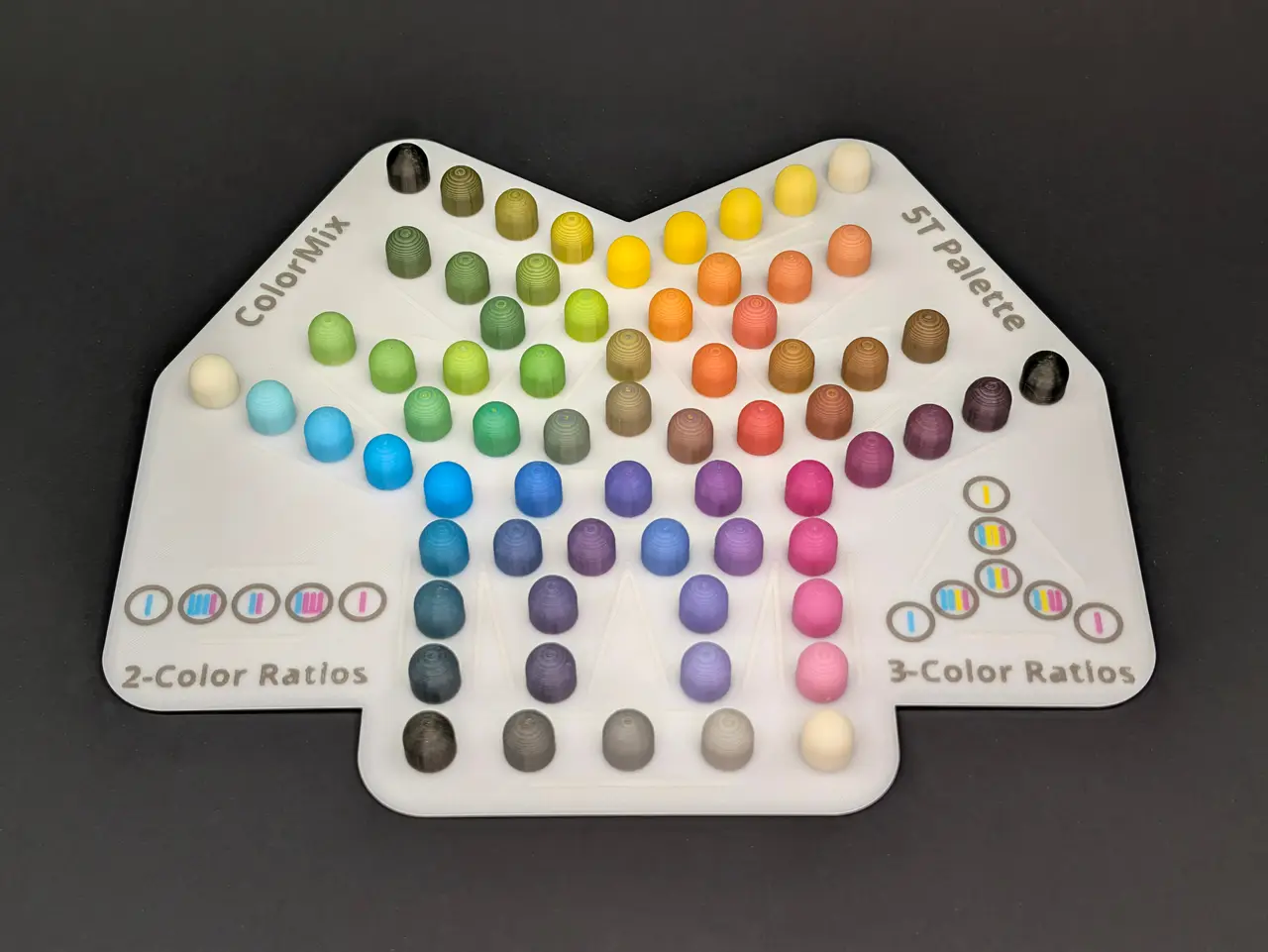
ColorMix 4, 5, and 8-Tool Color Sample Palettes
por Dave G. en Printables
Color sample palettes with a unique layout to easily decode every possible high-quality 2-color and 3-color blend
Licencia
Uso comercial permitidoPuedes imprimirlo, modificarlo y venderlo dando crédito al autor.
Al descargar aceptas respetar la licencia y dar crédito a Dave G..
Archivos (24)
- ColorMix_5T_Pallette.3mf 3MF · 1,5 MB
- ColorMix_4T_Pallette.3mf 3MF · 1007 KB
- ColorMix_5T_Pallette.3mf 3MF · 1,5 MB
- ColorMix_4T_Pallette.3mf 3MF · 1007 KB
- ColorMix_5T_Pallette.3mf 3MF · 1,5 MB
- ColorMix_4T_Pallette.3mf 3MF · 1007 KB
- ColorMix_5T_Pallette.3mf 3MF · 1,5 MB
- ColorMix_4T_Pallette.3mf 3MF · 1008 KB
- ColorMix_5T_Pallette.3mf 3MF · 1,5 MB
- ColorMix_4T_Pallette.3mf 3MF · 1009 KB
- ColorMix_5T_Pallette.3mf 3MF · 1,5 MB
- ColorMix_4T_Pallette.3mf 3MF · 1011 KB
- ColorMix_5T_Pallette.3mf 3MF · 1,5 MB
- ColorMix_4T_Pallette.3mf 3MF · 1014 KB
- ColorMix_4T_Pallette.3mf 3MF · 1014 KB
- ColorMix_8T_Pallette.3mf 3MF · 3,4 MB
- ColorMix_5T_Pallette.3mf 3MF · 1,5 MB
- ColorMix_4T_Pallette.3mf 3MF · 1013 KB
- ColorMix_8T_Palette.stl STL · 16,3 MB
- ColorMix_5T_Palette.stl STL · 6,9 MB
- ColorMix_4T_Palette.stl STL · 4,4 MB
- ColorMix_8T_Palette.step STEP · 2,2 MB
- ColorMix_5T_Palette.step STEP · 1,9 MB
- ColorMix_4T_Palette.step STEP · 1,7 MB
- Categoría
- Para tu impresora
- Formatos
- 3MF, STL, STEP
- Descargas
- 22
- Publicado
Sobre este modelo
This is a set of color sample palettes for ColorMix that let you see what every possible high-quality 2-color and 3-color blend actually looks like with your filament. It has a legend on the model and a unique layout to make it easy to decode and recreate every printed color in your slicer. Each color sample is shown on a small hemispherical dome, so you can easily see how good the blending effect is on surfaces that aren't perfectly vertical. ColorMix works by alternating thin layers of filament in a repeating pattern that tricks the eye into seeing colors that aren't really there. The effect is improved by using slightly-translucent filaments so that the reflected light that you see has passed through multiple different-colored layers. These palettes include only colors that can be made with repeating layer patterns of length 4 or fewer. Longer patterns can reach more colors but the quality of the color blending drops significantly and you will have visible banding at any viewing distance, which spoils the effect. Here are the number of colors supported by each model: Number of Filaments 2-Color Mixes 3-Color Mixes Total Colors
4 18 16 38
5 30 28 63
8 66 88 162
Basic Color Theory Color theory is a very complex subject. In simple terms for our use, there is an additive color system and a subtractive color system. The additive primary colors are typically Red, Green, and Blue, and this color system is reserved for media that emits its own light (like the pixels of the screen you are looking at right now). These three colors can be combined in different ratios to reproduce almost every color, with all three being combined to make white light.
The subtractive primary colors (Cyan, Magenta, and Yellow) are what we are concerned with here. They are used for media that allow external light to either pass through or reflect off the pigment and into your eye. These pigments work by absorbing unwanted colors so that whatever is left is what you see. Cyan pigment absorbs a band of colors at the red end of the visible spectrum. Magenta pigment absorbs a band of colors in the green middle of the spectrum. Yellow pigment absorbs a band of colors at the blue/violet end of the spectrum. By mixing these colors, we can indirectly adjust the amount of red, green, and blue light that makes it to your eye by removing everything we don't want. The absorption bands usually aren't perfect for these pigments, so mixing all three doesn't perfectly absorb the entire spectrum and won't produce a pure black. It's usually an ugly dark grayish-greenish-brownish color. This is why print media usually adds a pure black pigment (called the Key color) to the CMYK mix. This allows easy access to darker versions of the normal mixed colors and high-quality black. White is usually reflected from the paper in print media. We don't have that as an option for 3D printing, so we can also supplement this set of colors with white (CMYKW) to lighten the mixtures or to produce high-quality white and shades of gray. Again, the absorption bands of the primary color pigments aren't perfect. You may not be able to combine Cyan, Magenta, or Yellow to produce the highest-quality shades of Red, Green, or Blue. Red often comes out leaning more toward orange, green is usually not too bad but can come out leaning more toward yellow, and blue often comes out leaning more toward purple. We can recover high-quality versions of these colors by directly including Red, Green, and Blue filament and carefully-controlling what they are mixed with. Because, remember, these are not the subtractive primary colors because they each absorb too much of the spectrum. Mixing red, green, or blue pigment with each other often leads to dark, muddy colors. Using the full CMYKWRGB spectrum is possible with the 8-Tool INDX version of the CORE One printers, and can allow you to easily reach the widest range of colors. Decoding Colors from These Palettes There is a 2-color and a 3-color legend on each palette that lets you decode the primary colors and their ratios that went into each printed sample. Guide lines are added to the models to help isolate each blended group, to make reading the palette easy. For example, all straight rows of 5 colors between parallel guide lines are 2-color mixes. The pure primary colors are at the ends, and the three middle colors are the widest separation possible with a repeating layer pattern length of 4 or less. This works out to ratios of 75%:25%, 50%:50%, and 25%:75%, shown by the little color lines in the 2-color legend. All groupings of three colors in a triangular shape with a single fourth color in the middle of the triangle are three-color blends, connecting the primary colors beyond the three vertices of the triangle. Guide lines are included on all three sides of these triangles. The middle mix is an equal 33%:33%:33% ratio, while the mixtures at each triangle vertex are in the ratio 50%:25%:25% between the three primary colors, favoring the closest primary color. These ratios are shown in the little color lines of the 3-color legend. Wider visual separation between these color blends are possible, like with 60%:20%:20% or 70%:15%:15% or 80%:10%:10% ratios, but they tend to have visible banding and lose the mixing effect. They are omitted from these palettes for this reason. The "off-axis" 3-color mixes also have wide pattern lengths and are not very different from the pure two-color mixes between each pair of primary colors, so they are also not included. For these color palettes, we are obviously limited to the two-dimensional plane of the print bed. Laying out the blends in an arrangement that makes sense for 4 or more base filament colors isn't always possible. One choice is to let the rows of the two-color blends cross over each other, which can be confusing. The choice made here is to duplicate the modifier colors (Black and White) in several locations around the palette, and also to "disconnect" some of the 3-color mix clusters so that they don't sit directly between the three colors being blended. As an example, the Cyan/Yellow panel is shown to the right. The 2-color blends of Cyan and Yellow sit at the bottom. The blends of Cyan and White extend up the left side and the blend of Yellow and Black extend up the right side. Mixes between Cyan/Black and Yellow/White colors extend into neighboring panels. The 3-color mixes of Cyan/Yellow/White sit to the left of the middle on the White side and Cyan/Yellow/Black sits to the right of the middle on the Black side. The blends that favor Cyan are on the bottom left of each triangle (toward the Cyan primary color) and blends that favor Yellow are on the bottom right of each triangle (toward the Yellow primary color). 4-Tool Palette This is intended for a basic CMYK or CMYW set of colors, although you can try blending anything you like. The layout between four colors would work out perfectly on the surfaces of a tetrahedron (a three-sided pyramid) because it has 4 vertices, 6 edges, and triangular sides. We're limited to two dimensions here, so we "fold" the sides of this tetrahedron down onto the print bed and duplicate the K or W color at the peak three times. Here is an example print, using the slightly translucent Prusament ColorMix filaments: - 🩵 Prusament PLA ColorMix Cyan
- 🩷 Prusament PLA ColorMix Magenta
- 💛 Prusament PLA ColorMix Yellow
- 🤍 Prusament PLA ColorMix White
(Please forgive the silly heart emojis. This is the only emoji shape that supports all of the colors we need here!) This print was done with a 0.10mm layer height for good blending of the colors. 5-Tool Palette The layout of this palette is more complicated, and requires use of the panels around the edges with the disconnected 3-color blends using White and Black, described in the section above about decoding the colors. Prusament ColorMix Filament Here is an example printed with Prusament ColorMix filaments, at a 0.10mm layer height: - 🩵 Prusament PLA ColorMix Cyan
- 🩷 Prusament PLA ColorMix Magenta
- 💛 Prusament PLA ColorMix Yellow
- 🖤 Prusament PLA ColorMix Black
- 🤍 Prusament PLA ColorMix White
Layer Height Effects To the right is pictured a comparison of this model printed with a 0.15mm layer height and a 0.10mm layer height. The thicker layer height has much more noticeable banding, even with these slightly translucent filaments. You will have to make a judgement whether the extra print time of the thinner layer height is worth it to improve the quality. Print waste might also be a consideration. All models pictured here were produced on a Prusa MK3.5S/MMU3 printer. The purge volume is fixed per filament swap, so more swaps with thinner layers leads to more waste. Prusament CMYK Filament To the right is a picture of what happens when using the new opaque Prusament CMYK filaments. - 🩵 Prusament PLA CMYK Cyan
- 🩷 Prusament PLA CMYK Magenta
- 💛 Prusament PLA CMYK Yellow
- 🖤 Prusament PLA Jet Black
- 🤍 Prusament PLA Pristine White
The banding is much more visible even with a 0.10mm layer height, although it is still quite good from a distance on mostly-vertical surfaces. The colors are also much bolder and less "pastel" than with the slightly-translucent ColorMix filaments. You'll have to choose your priorities when selecting your filaments. Polymaker Translucent Filament This is an experiment with a different brand of filament. Here is this model printed with only Polymaker Panchroma Translucent filaments: - 🩵 Polymaker Translucent PLA Cyan
- 🩷 Polymaker Translucent PLA Magenta
- 💛 Polymaker Translucent PLA Yellow
- 🩶 Polymaker Translucent PLA Gray
- 🤍 Polymaker Translucent PLA Natural
The hope here was that their Gray would be able to darken the mixes and their Natural, which has a hazy off-white color on the spool, would lighten the mixes. This didn't work. The Natural color prints almost clear and colorless, so it does lighten the mixes slightly but only by reducing the concentration of the CMY pigments. The Gray filament is too light to do much, and only serves to make the mixes slightly more... gray. These filaments were apparently designed for making lithophanes before Full Spectrum or ColorMix was created, so it's not too surprising that they don't work very well. Polymaker Translucent + Prusament ColorMix Filament I tried this print again with a hybrid approach, using Polymaker Panchroma Translucent for the CMY colors and Prusament ColorMix for the KW colors (which are really good for this purpose). This worked out really well. - 🩵 Polymaker Translucent PLA Cyan
- 🩷 Polymaker Translucent PLA Magenta
- 💛 Polymaker Translucent PLA Yellow
- 🖤 Prusament PLA ColorMix Black
- 🤍 Prusament PLA ColorMix White
The Polymaker Translucent filaments work very similarly to the Prusament ColorMix filaments, although they appear to be a little bit more saturated and can produce slightly bolder blended colors, while also being slightly more translucent and blending better. Combining them with Prusa's ColorMix Black and White filament seems just about ideal. Prusament ColorMix Glitter Filament These are just some fun experiments to see what the ColorMix Silver and Gold Glitter filaments look like when combined with different colors and materials. First is a blend with ColorMix Cyan, Magenta, and Yellow filaments: - 🩵 Prusament PLA ColorMix Cyan
Descripción original del autor, publicada en Printables.



