
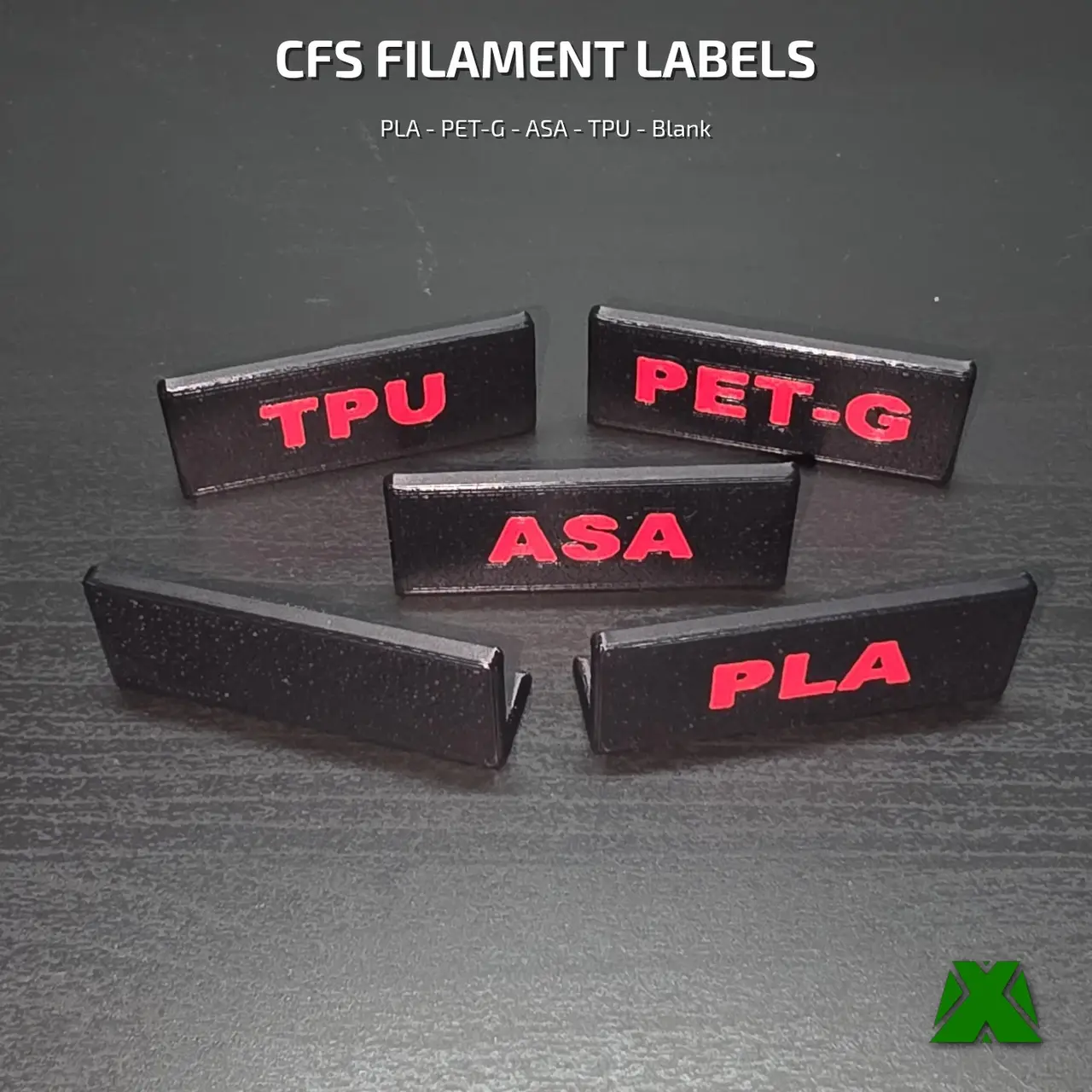
CFS Front Labels
por MakerX en MyMiniFactory
The "What's Actually Loaded Right Now" CFS Filament Labels 🎯
MyMiniFactory entrega los archivos a usuarios con cuenta gratuita
Licencia
Solo uso personalCC BY-NC-ND 4.0 — Atribución, no comercial, sin derivadas
Solo para uso personal, sin modificarlo y dando crédito. No se permite vender ni redistribuir cambios.
Al descargar aceptas respetar la licencia y dar crédito a MakerX.
Archivos (11)
- Makerx Cfs Front Label All.3Mf 3MF
- Makerx Cfs Front Label Asa.3Mf 3MF
- Makerx Cfs Front Label Asa.stl STL
- Makerx Cfs Front Label Blank.3Mf 3MF
- Makerx Cfs Front Label Blank.stl STL
- Makerx Cfs Front Label Petg.3Mf 3MF
- Makerx Cfs Front Label Petg.stl STL
- Makerx Cfs Front Label Pla.3Mf 3MF
- Makerx Cfs Front Label Pla.stl STL
- Makerx Cfs Front Label Tpu.3Mf 3MF
- Makerx Cfs Front Label Tpu.stl STL
- Categoría
- Para tu impresora
- Formatos
- 3MF, STL
- Descargas
- 8
- Publicado
Sobre este modelo
The "What's Actually Loaded Right Now" CFS Filament Labels 🎯
Your Creality CFS has four slots loaded and zero indication of what's actually in them — so you're opening the cover or guessing until a print goes wrong. I wanted something that just tells you at a glance. So I designed this.
🟩 𝗪𝗛𝗔𝗧 𝗠𝗔𝗞𝗘𝗦 𝗜𝗧 𝗪𝗢𝗥𝗞
▸ 𝗦𝗹𝗶𝗱𝗲𝘀 𝗥𝗶𝗴𝗵𝘁 𝗨𝗻𝗱𝗲𝗿 𝘁𝗵𝗲 𝗙𝗿𝗼𝗻𝘁 𝗘𝗱𝗴𝗲 — No adhesive, no clips, no modding the CFS itself. Slides into place and stays put.
▸ 𝗙𝗿𝗼𝗻𝘁-𝗙𝗮𝗰𝗶𝗻𝗴, 𝗔𝗹𝘄𝗮𝘆𝘀 𝗩𝗶𝘀𝗶𝗯𝗹𝗲 — Clearly marks the material loaded in each slot so you never have to guess what's in the CFS right now.
▸ 𝗙𝗶𝘃𝗲 𝗟𝗮𝗯𝗲𝗹𝘀 𝗜𝗻𝗰𝗹𝘂𝗱𝗲𝗱 — PLA, PET-G, ASA and TPU, plus a blank you can letter yourself. One 3MF holds all five, one per plate: open it, pick your label, slice. Individual STLs are in there too.
▸ 𝗠𝘂𝗹𝘁𝗶-𝗖𝗼𝗹𝗼𝗿 — Needs a CFS or AMS — The 3MF is set up black body with red text, 3 filament changes per label. Printing them in two colors needs a CFS, AMS or other multi-material unit. Start from the 3MF and the setup is already done.
▸ 𝗦𝘁𝗮𝗿𝘁𝗶𝗻𝗴 𝗙𝗿𝗼𝗺 𝘁𝗵𝗲 𝗦𝗧𝗟? 𝗣𝗮𝗶𝗻𝘁 𝘁𝗵𝗲 𝗧𝗲𝘅𝘁 — The STLs carry the lettering as real geometry, but color is not part of an STL. Select the part, open Paint in your slicer and color the text. Skip that and it slices in one color, which is why the text can look like it vanished.
▸ 𝗣𝗿𝗶𝗻𝘁 𝘁𝗵𝗲 𝗟𝗲𝘁𝘁𝗲𝗿𝗲𝗱 𝗙𝗮𝗰𝗲 𝗗𝗼𝘄𝗻 — Put the colored face on the build plate. It prints faster and wastes far less filament on purge.
🟩 𝗧𝗛𝗘 𝗡𝗨𝗠𝗕𝗘𝗥𝗦
Each label is 50 × 20 × 12.5 mm
▸ Labeled tags run 20m 40s to 20m 58s at 5.95 g each
▸ 𝗧𝗵𝗲 𝗯𝗹𝗮𝗻𝗸 𝗶𝘀 𝟭𝟯𝗺 𝟰𝟴𝘀 𝗮𝗻𝗱 𝟯.𝟳𝟬 𝗴 — single color, no purge tower
▸ All five plates together: 1h 37m and 27.5 g
🟩 𝗣𝗥𝗜𝗡𝗧 𝗦𝗘𝗧𝗧𝗜𝗡𝗚𝗦
No supports required · No brim · face-down · 0.20mm layer height · 2 walls · 15% infill · two-color via CFS/AMS
Need a material name that isn't in the set? Reach out and I'll make it.
Happy labeling! 🎯
Descripción original del autor, publicada en MyMiniFactory.



