
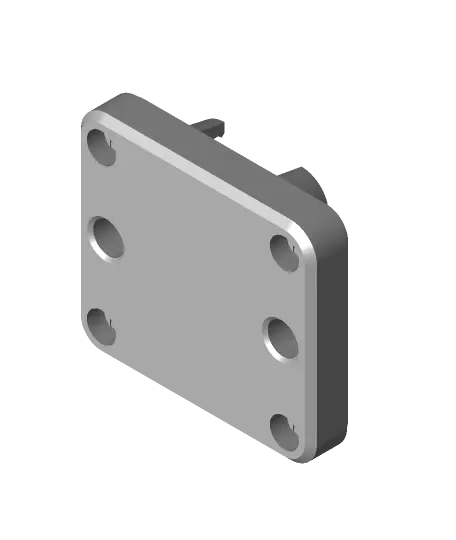
Case for Adafruit QT PY RP2040
Case for Adafruit QT PY RP2040
Thangs entrega los archivos a usuarios con cuenta gratuita
Licencia
Revisa las condicionesLicense
El autor usa su propia licencia. Revisa sus condiciones en la página original antes de compartir, modificar o vender.
Al descargar aceptas respetar la licencia y dar crédito a motocoder.
Archivos (4)
- Smaller_Bottom.stl STL · 336 KB
- Smaller_Top.stl STL · 231 KB
- README.md MD
- README.pdf PDF
- Categoría
- Para tu impresora
- Formatos
- STL, MD, PDF
- Descargas
- 35
- Publicado
Sobre este modelo
Case for Adafruit QT PY RP2040
This is a case for the Adafruit QT PY RP2040 board. The QT PY RP2040 is a small microcontroller board based on the Raspberry Pi RP2040 microcontroller. It has a USB interface and a very tiny form factor. I am using this to interface with an ADXL345 accelerometer for use with Klipper's Resonance Compensation (aka Input Shaper). I wanted something to hold the RP2040 so that it doesn't short out. The underside of the case has two magnets, which can be used to secure the case to a nearby ferrous object (like the X axis rods, or the heatbed on a Prusa MK3) during measurements. Hardware - 5x5mm rare earth magnets Amazon.com (https://www.amazon.com/gp/product/B075PNR4W5/ref=ppx_yo_dt_b_search_asin_title?ie=UTF8&psc=1) - M2.5 x 0.45mm thread, 8mm long Socket Head Screw McMaster-Carr (https://www.mcmaster.com/91290A102/) or BoltDepot.com (https://www.boltdepot.com/Product-Details.aspx?product=6371) (Note: longer lengths should work too) - Tapered Heat-Set Inserts for Plastic - M2.5 x 0.45mm thread McMaster-Carr (https://www.mcmaster.com/94180A321/) Assembly
1. Press heat-set inserts into top using heat-set press or soldering iron. 2. Press magnets into the two large holes in the bottom. They should go in with a little resistance, but should not require gorilla force to insert. If you have issues inserting them, or if they are too loose, I have provided the Fusion 360 source (check the User Parameter, magnet_hole). 3. Insert a zip tie through the slot in the cable retainer. This is used to provide strain relief for your the cable going to the ADXL345 (or whatever other electronic device you are controlling). The hole is big enough to accept ~5-6mm shrouded, 6-conductor cable. 4. Insert M2.5 screws in bottom, and into heat-sets on top.
Descripción original del autor, publicada en Thangs.



