
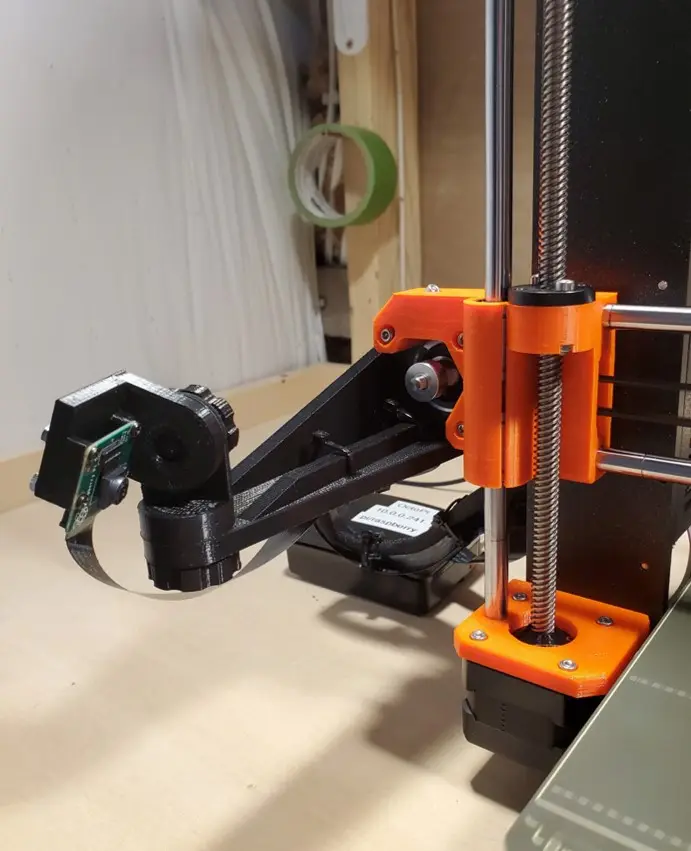
Camera Mount-Prusa MK3s
por mhparsons en Printables
This is a mount for a Raspberry PI Camera on a Prusa Technologies MK3s 3D Printer.
Licencia
Uso comercial permitidoPuedes imprimirlo, modificarlo y venderlo dando crédito al autor.
Al descargar aceptas respetar la licencia y dar crédito a mhparsons.
Archivos (6)
- Categoría
- Para tu impresora
- Formatos
- STL
- Descargas
- 1,150
- Publicado
Sobre este modelo
This is a mount for a Raspberry PI Camera on a Prusa Technologies MK3s 3D Printer. The mount attaches to the X-Axis Motor with a single M3x10 screw (use one from the Prusa spares package.). The design is for a Raspberry Pi v2 Video Camera. Print instructions Category: 3D Printer Parts Print Settings Printer Brand: MK3 Printer: Prusa i3 Rafts: No Supports: No Resolution: Medium (0.2mm) Infill: 30% Filament: Hatchbox PLA Black Notes: 1/26/23: An update to this design can be found at: https://www.printables.com/model/376326-camera-mount-prusa-mk3s Original Notes: The Camera Board is attached to the Mount with four #2 screws. Put two spacers between the camera board and the mount to create space for the components on the board. The mount provides 2-axis adjustment so you can obtain the exact view you want. Print two of the Knobs. There are holes in the main bracket for tie wraps to route and secure the camera's ribbon cable. I have also included a simple Clip you can tie wrap to the X-axis motor cable and attach the ribbon cable with tie wraps. I used three Clips. Finally, when it was first assembled the camera was not in focus. The factory sets the focal length to infinity. There are instructions on the internet on how to focus it. Essentially, I held the camera housing on the board carefully with needle-nose pliers and then rotated the lens counter-clockwise with a pin until it was in focus. There's a little soft cement that holds the lens secure, so you will need to push a bit past where it is in focus and let the cement spring back into it's final position. How I Designed This TinkerCAD
Descripción original del autor, publicada en Printables.



