
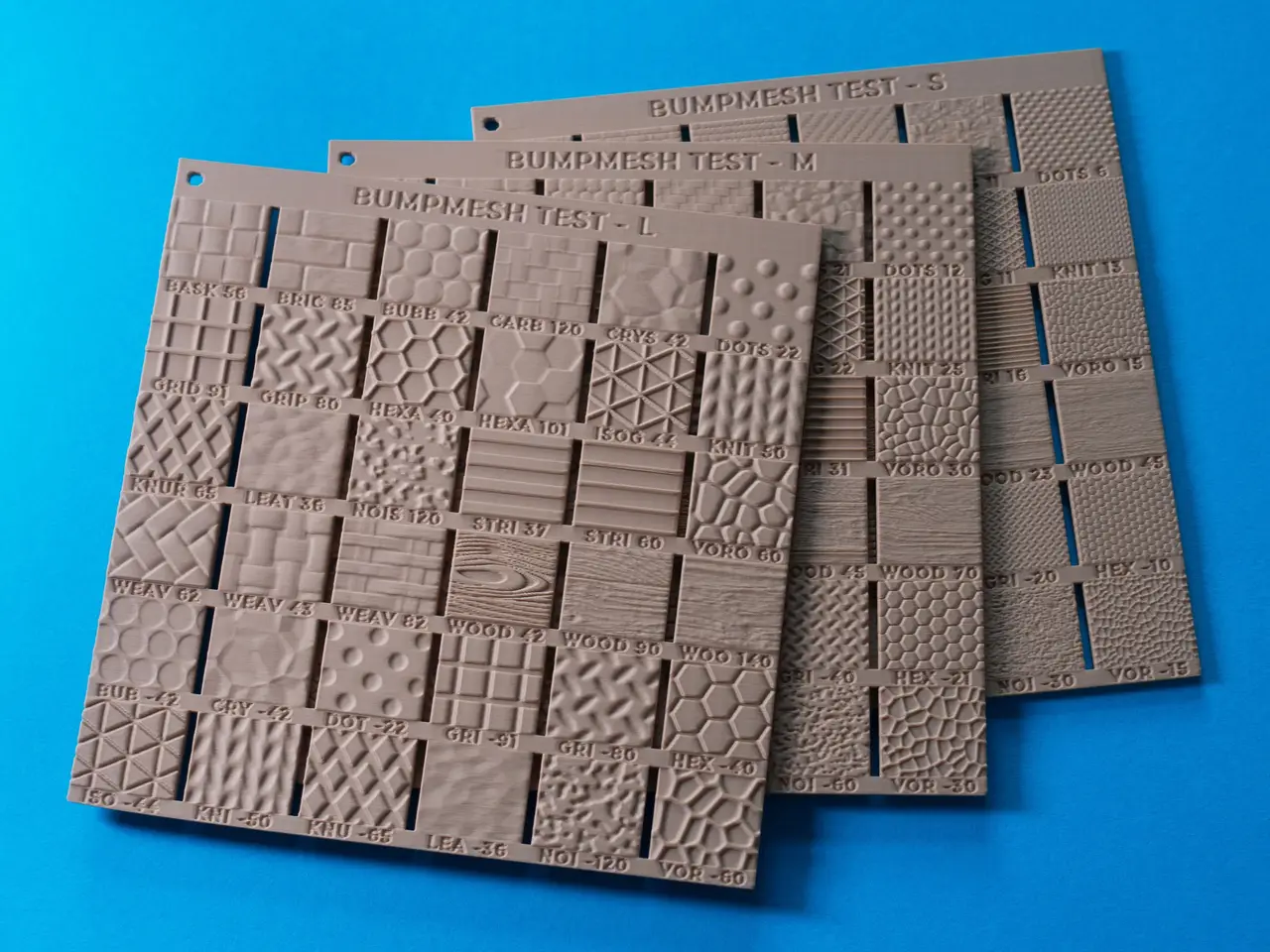
BumpMesh Test – Sample Plates for Default Textures
por inno3design en Thingiverse
These sample plates allow you to quickly compare all the different BumpMesh default patterns in three different sizes, helping you determine the best choice for your own designs. BumpMesh.com is an awesome free tool created by the YouTuber CNC Kitchen. It lets you apply different alpha map textures.
Licencia
Solo uso personalCC BY-NC-SA 4.0 — Atribución, no comercial, compartir igual
Uso personal dando crédito; sin fines comerciales y las modificaciones con la misma licencia.
Al descargar aceptas respetar la licencia y dar crédito a inno3design.
Archivos (8)
- OrcaSlicer__BumpMesh.3mf 3MF · 34,9 MB
- Bambu_Studio__BumpMesh.3mf 3MF · 34,9 MB
- PrusaSlicer__BumpMesh_text_baked-in.3mf 3MF · 38,0 MB
- text_baked-in__L-size.stl STL · 66,1 MB
- text_baked-in__M-size.stl STL · 65,7 MB
- text_baked-in__S-size.stl STL · 65,4 MB
- template_1_just_blocks_for_BumpMesh_import.stl STL · 1,8 MB
- template_2_all_objects_for_BumpMesh_import.stl STL · 1,8 MB
- Categoría
- Para tu impresora
- Formatos
- 3MF, STL
- Descargas (todas las plataformas)
- 726
- Publicado
También en
Sobre este modelo
These sample plates allow you to quickly compare all the different BumpMesh default patterns in three different sizes, helping you determine the best choice for your own designs. BumpMesh.com is an awesome free tool created by the YouTuber CNC Kitchen. It lets you apply different alpha map textures to your own 3D models to create 3D patterns on their surfaces, somewhat similar to Fuzzy Skin. The software is super easy to use and runs directly in your browser. The square plates are pretty thin, making them easy to stack while taking up very little storage space. To stabilize them during printing, each plate includes two support feet on the back. Their attachment points are intentionally tiny, allowing the feet to break away cleanly and easily. Each grid block showcases one of the BumpMesh patterns. In addition, the two bottom rows show several of the patterns as inverted versions. Each number at the front represents the individual scaling factor. On the back, all other relevant BumpMesh settings are also listed (mostly left at default).
SLICER / FILES The download includes different 3MF and STL file versions. Make sure to open the print file optimized for the slicer you use, which you can identify by the file name. - The 3MF files for OrcaSlicer and Bambu Studio offer the most flexibility. You can move or swap any individual pattern block using the slicer's objects-list, or edit any text label directly in the slicer. I used the free font “Montserrat”. - Template: They also contain a fourth plate without any patterns. You can use that, if you want to create your own plate with different settings or even apply your own textures to it. - The 3MF file for PrusaSlicer contains baked-in text, which cannot be edited. - There are 3 STL files with also baked-in text, each containing one of the 3 test plates. You can use these if your slicer is not compatible with any of the 3MF files. - The two template STLs can be imported into the BumpMesh tool to test your own settings or textures.
SIMILAR PROJECTS You might also like my other test plate downloads with the same compatible dimensions for stacking / bundling: - Fuzzy Skin Test with 5 plates (very detailed) - Fuzzy Skin Test LITE (compact on just one plate) - Filament Sample Plate (coming soon...)
SPECS - Dimensions: 160 × 160 × 3 mm (up to 3.6 mm including patterns) - Pattern types: All 24 default patterns and 12 inverted ones
PRINTING NOTES - Filament: PLA with a matte surface recommended - Bed adhesion: A well-cleaned textured PEI plate is usually fine without a brim - Support: No additional structure is needed apart from the two built-in support feet
Descripción original del autor, publicada en Thingiverse.



