
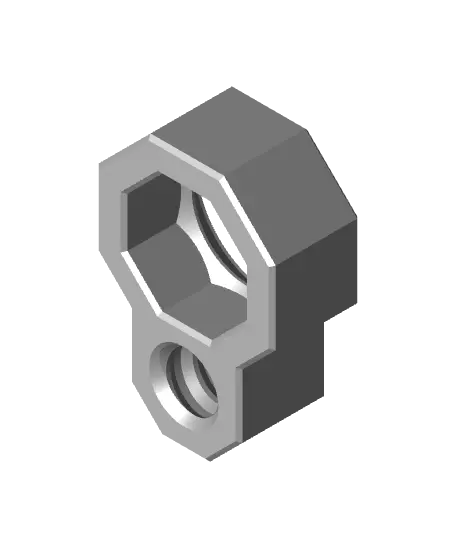
Bracket-Fix Point Joint
por Jonathan K en Thangs
Use this part to add Point connections onto a Bolt-Locked Bracket (https://link.Multiboard.io/bolt-locked-brackets) to hold a Tray (https://link.Multiboard.io/tray).
Thangs entrega los archivos a usuarios con cuenta gratuita
Licencia
Revisa las condicionesMULTIBOARD LICENCE - Download Terms and Conditions - 12-June-2024
El autor usa su propia licencia. Revisa sus condiciones en la página original antes de compartir, modificar o vender.
Al descargar aceptas respetar la licencia y dar crédito a Jonathan K.
Archivos (1)
- Bracket-Multipoint Adapter.stl STL · 880 KB
- Categoría
- Herramientas
- Formatos
- STL
- Descargas
- 4,165
- Publicado
Sobre este modelo
Use this part to add Point connections onto a Bolt-Locked Bracket (https://link.Multiboard.io/bolt-locked-brackets) to hold a Tray (https://link.Multiboard.io/tray).
Attach this part to a Bolt-Locked Bracket using a Locking Bolt (https://link.multiboard.io/locking-bolts), then screw in a Point (https://than.gs/m/1123334) into the small thread hole.
Printing Guidelines:
Use 3 perimeter wall thickness, 0.2 mm layer height, 15% infill, and no supports. Apart from that, use your printer's default settings.
The printing orientation is as provided in the file. Make sure the downloaded files are .STL. This part has been designed with a tolerance of 0.25 mm. Your printer will need to be able to bridge gaps of up to 30 mm for some designs.
For more information about printer settings, click here (https://multiboard.io/knowledge-hub/printing-guidelines).
---
This object is part of Multiboard, a FREE and ridiculously modular organization system with thousands of parts, for creating the most adaptable workspace possible. Learn more and find ALL the parts at https://multiboard.io
Descripción original del autor, publicada en Thangs.



