
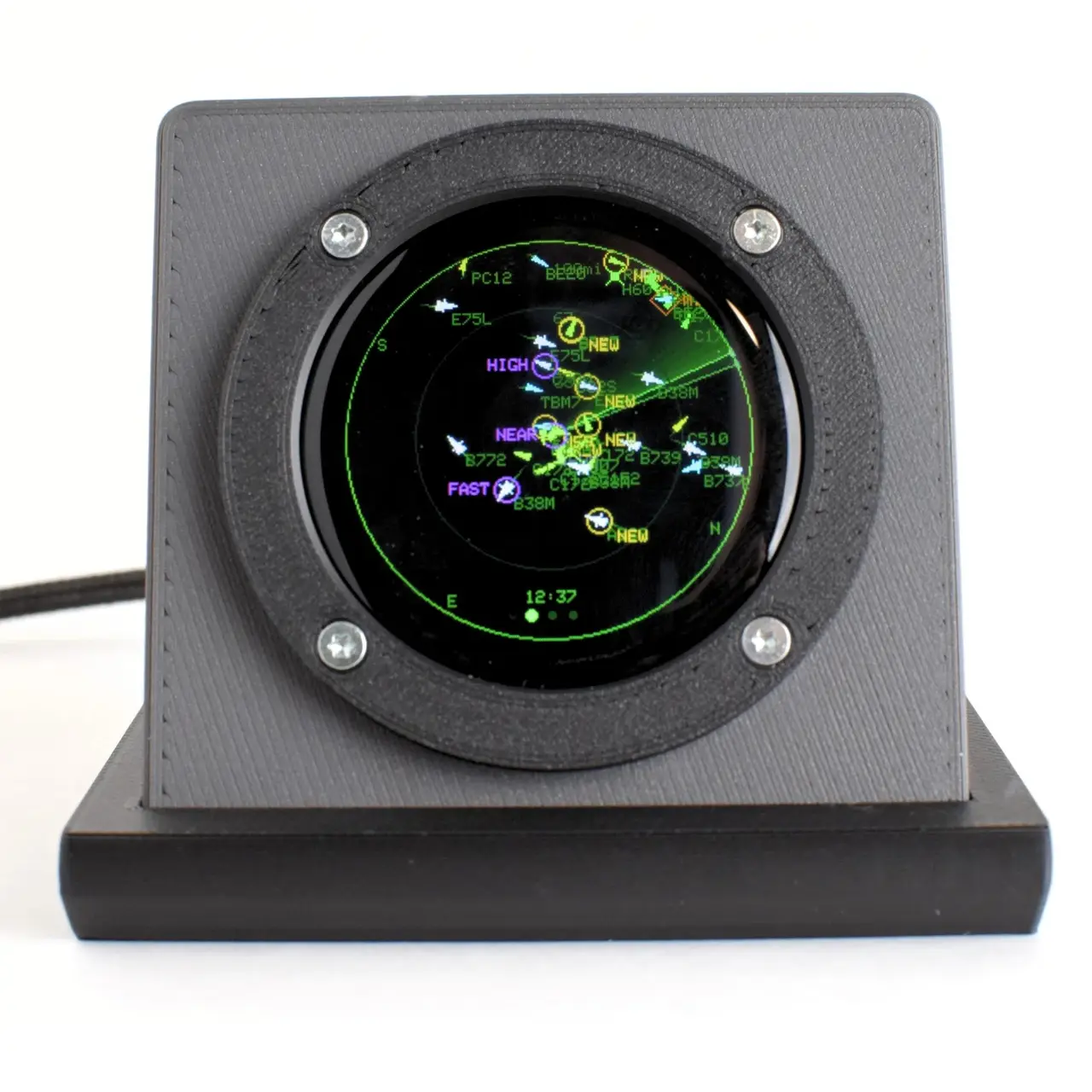
Blipscope - Desk Radar for Live Aircraft (ADS-B)
por Valar Systems en Printables
A desk radar scope that shows the aircraft over your house, live. Print the case: two plates, no supports.
Licencia
Solo uso personalCC BY-NC-SA 4.0 — Atribución, no comercial, compartir igual
Uso personal dando crédito; sin fines comerciales y las modificaciones con la misma licencia.
Al descargar aceptas respetar la licencia y dar crédito a Valar Systems.
Archivos (12)
- blipscope-back-small.stl STL · 143 KB
- blipscope-v5-plate1-black-bezel-base.3mf 3MF · 315 KB
- blipscope-v5-plate2-color-body-back.3mf 3MF · 555 KB
- blipscope-bottom-housing.stl STL · 837 KB
- blipscope-front-housing.stl STL · 760 KB
- blipscope-back-plate.stl STL · 531 KB
- blipscope-bezel.stl STL · 974 KB
- blipscope-bezel.step STEP · 71 KB
- blipscope-bottom-housing.step STEP · 71 KB
- blipscope-back-small.step STEP · 85 KB
- blipscope-front-housing.step STEP · 191 KB
- blipscope-back-plate.step STEP · 519 KB
- Categoría
- Tecnología
- Formatos
- STL, 3MF, STEP
- Descargas
- 15
- Publicado
Sobre este modelo
Blipscope is a small radar scope that sits on your desk and sweeps the sky above you. It shows the aircraft actually overhead, live, on a 1.28 inch round display under curved glass. Tap a contact and it tells you what it is, who is flying it and where it is going. Military traffic comes up flagged orange, helicopters violet, medevac blue. Squawk 7700 pulses a red ring. It keeps a lifelist of every type and airline it has ever seen from your window. These are the printed parts for the Blipscope DIY Kit. The Kit is everything except the plastic: the flashed ESP32-S3 board with the round touch display, the FPC antenna, the USB-C panel mount cable, all the screws and nuts, the steel weights for the base and the non-slip pads. Print these files and you have the same instrument we sell assembled. Kit: https://valarsystems.com/products/blipscope Firmware, open source: https://github.com/Valar-Systems/Blipscope Setup guide: https://valarsystems.com/blipscope Files Two print plates saved as 3MF projects (open them in PrusaSlicer) with the settings we use for the units we ship, plus STEP and STL for every part if you want to re-slice or remix. - Plate 1, black: bezel (instrument ring), bottom housing (weighted base), back small (USB port block)
- Plate 2, body color: front housing, back plate
The assembled units are printed in Polymaker Panchroma PLA Matte, Ash Grey body with black bezel and base. Any matte PLA works. The STLs are in model orientation; the 3MF projects have every part already laid out to print. Print settings - Printer: any 0.4 mm nozzle printer with a 180 mm or larger bed
- Layer height 0.20 mm
- Walls 2 (3 if your PLA is on the brittle side; the screws are thread-forming)
- Infill 15% gyroid
- Supports: none. Every part is oriented to print support free.
- Brim: auto
- Material: PLA Matte. PETG works but the bezel shows layer lines more.
What comes in the Kit - Flashed ESP32-S3 board with the 1.28 inch round touch display
- 2.4 GHz FPC antenna
- USB-C panel mount extension, 10 cm
- 4 x M2 screws for the board
- 10 x M2 x 10 mm flat head thread-forming screws (4 for the bezel, 6 for the housing)
- 2 x M2 pan head screws and 2 x M2 hex nuts for the USB panel mount
- 4 x steel weights for the base
- 4 x non-slip pads for the underside
Assembly - Print both plates. Let the bezel cool fully on the bed before lifting it so it stays flat.
- Drop the four steel weights into the pockets in the bottom housing. A dot of CA glue keeps them from rattling.
- Fit the USB-C panel mount into the back small block with the two M2 pan heads and nuts. Route the cable inside.
- Mount the board in the front housing with the four M2 board screws. Peel the backing and stick the FPC antenna to the inside wall away from the board.
- Plug the panel mount cable into the board.
- Fit the back plate and drive six M2 x 10 thread-forming screws. Snug, not tight; PLA strips if you keep going after it seats.
- Set the bezel over the glass and drive the last four M2 x 10 screws.
- Fit the front housing onto the bottom housing and stick the four pads on the underside.
- Plug it in. Join the Wi-Fi hotspot it creates, open the address in a browser, paste in your latitude and longitude. Aircraft appear within a few seconds.
About the electronics The Kit board is an ESP32-S3 with 16 MB flash and 8 MB PSRAM driving a 1.28 inch 240 x 240 IPS display with capacitive touch. Firmware is open source with over the air updates. No app, no account, no subscription. Aircraft data comes from adsb.fi and adsb.lol, community networks we sponsor, or from your own ADS-B receiver for one second updates. License Printed parts: CC BY-NC-SA 4.0. Print it, modify it, share your remix, credit Valar Systems, do not sell prints. Firmware: Open Community License (OCL v1), see the GitHub repo. Questions and build photos welcome in the comments. If you make a remix for a different display or a wall mount, tag it and I will link it here.
Descripción original del autor, publicada en Printables.



