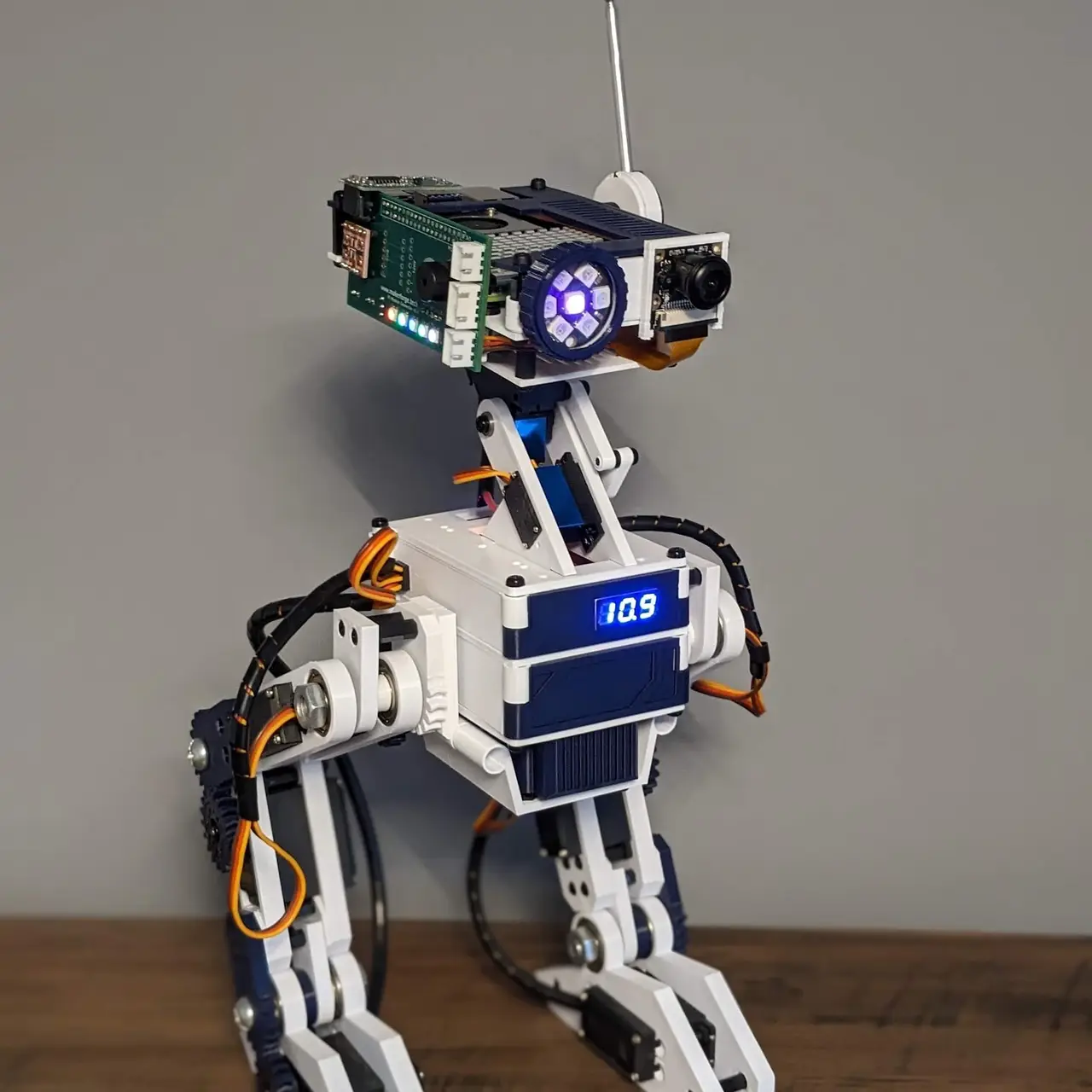
Bipedal Companion Robot (Open Source, 3D Printable)
por Dan Nicholson en Thingiverse
Open Source, 3D Printable, Modular Bipedal Robot Project The Modular Bipedal Robot project aims to educate and inspire individuals interested in robotics and electronics. This open-source initiative focuses on creating a fully autonomous companion robot with a variety of advanced features. Key...
Licencia
Uso comercial permitidoPuedes usarlo, modificarlo y venderlo; si distribuyes versiones modificadas deben ir con la misma licencia y sus fuentes.
Al descargar aceptas respetar la licencia y dar crédito a Dan Nicholson.
Archivos (38)
- Body_-_Voltmeter.3mf 3MF · 10 KB
- Body_-_Battery_Front_Panel.3mf 3MF · 12 KB
- Body_-_Mount_mirror.3mf 3MF · 19 KB
- Body_-_Power_Front.3mf 3MF · 11 KB
- Body_-_Left_Side_Panel.3mf 3MF · 15 KB
- Body_-_Battery_Right_Panel.3mf 3MF · 14 KB
- Body_-_Right_Side_Panel.3mf 3MF · 15 KB
- Body_-_Battery_Left_Panel.3mf 3MF · 14 KB
- Body_-_Power_Back.3mf 3MF · 12 KB
- Body_-_Top_Back_Panel.3mf 3MF · 14 KB
- Body_-_Battery_Panel.3mf 3MF · 15 KB
- Body_-_Large_Shelf.3mf 3MF · 66 KB
- Body_-_Mount.3mf 3MF · 31 KB
- Body_-_Cradle.3mf 3MF · 54 KB
- Head_Modules_-_Lower.3mf 3MF · 44 KB
- Head_Modules_-_Face.3mf 3MF · 21 KB
- Head_Modules_-_Middle.3mf 3MF · 48 KB
- Head_Modules_-_Lens.3mf 3MF · 15 KB
- Head_Modules_-_Servo_Mount.3mf 3MF · 20 KB
- Head_Modules_-_Upper_reduced.3mf 3MF · 22 KB
- Foot.3mf 3MF · 64 KB
- Leg_-_Dynamic_-_Gear_Support_Shim.3mf 3MF · 8 KB
- Leg_-_Dynamic_-_Servo_Mount_Spacer.3mf 3MF · 31 KB
- Leg_-_Dynamic_-_Outer_Spacer.3mf 3MF · 8 KB
- Leg_-_Dynamic_-_Gear_Support.3mf 3MF · 102 KB
- Leg_-_Dynamic_-_Servo_Mount.3mf 3MF · 30 KB
- Neck_-_ServoArmExt.3mf 3MF · 12 KB
- Neck_-_ServoArm.3mf 3MF · 14 KB
- Neck_-_Support_mirror.3mf 3MF · 13 KB
- Neck_-_PanServoMount.3mf 3MF · 69 KB
- Neck_-_Support.3mf 3MF · 13 KB
- Neck_-_ServoHorn.3mf 3MF · 25 KB
- Hip_-_Bearing_Spacer.3mf 3MF · 8 KB
- Gear_-_Herring1.55.18t.3mf 3MF · 107 KB
- Hip_-_Screw_Spacer.3mf 3MF · 8 KB
- Hip_-_Drive.3mf 3MF · 77 KB
- Head_Modules_-_Ear_Inner.3mf 3MF · 27 KB
- Head_Modules_-_Ear_Outer.3mf 3MF · 27 KB
- Categoría
- Varios
- Formatos
- 3MF
- Descargas
- 2,200
- Publicado
Sobre este modelo
Open Source, 3D Printable, Modular Bipedal Robot Project The Modular Bipedal Robot project aims to educate and inspire individuals interested in robotics and electronics. This open-source initiative focuses on creating a fully autonomous companion robot with a variety of advanced features. Key Features - Bipedal Design: The robot includes articulated legs for bipedal movement. - Control Systems: Utilizes Arduino and Raspberry Pi, managed through custom PCBs. - Modular Body: Configurable body components allow for easy customization and adaptability. - Software Modules:- Animation: Handles the animation of the robot, including walking, turning, and other movements. - Braillespeak: Converts text to Braille and speaks it using a proprietary audio output using the onboard buzzer. - Buzzer: Controls the buzzer for audio output. Includes the ability to play tones and melodies. - ChatGPT: Uses the OpenAI GPT models to process text based on user input. - Logging: Logs data to a file for debugging and analysis. - Motion Detection: Handles motion detection using an onboard microwave motion sensor. - Neopixel: Controls the onboard Neopixel LEDs for visual feedback. - PiServo: Controls the servos connected to the Raspberry Pi. - PiTemperature: Reads the temperature from the integrated temperature sensor on the Raspberry Pi. - RTLSDR: Uses an RTL-SDR dongle to receive and process radio signals. - Serial Connection: Handles serial communication between the Raspberry Pi and Arduino. - Servos: Controls the servos connected to the Arduino via the Raspberry Pi and the serial connection. - Tracking: Uses computer vision to track objects and faces using the onboard camera. - Translator: Translates text between languages using the Google Translate API. - TTS: Converts text to speech using the onboard speaker. - Viam: Uses the VIAM API to integrate Viam modules for additional functionality. - Vision: Handles image processing and computer vision tasks using the onboard IMX500 Raspberry Pi AI camera. - Read more!
Project Background The Modular Biped Robot Project is designed to provide a flexible and modular framework for robotics development using Python and C++ on the Raspberry Pi and Arduino platforms. It aims to enable developers, robotics enthusiasts, and curious individuals to experiment, create, and customize their own biped robots. With a range of features and functionalities and the option to add your own easily, the Modular Biped Robot Project offers an exciting opportunity to explore the world of robotics. Modularity The open source framework is designed for flexibility, allowing users to easily add or remove components to suit their specific needs. Comprehensive guides are provided for integrating new modules seamlessly. Resources - Documentation: For detailed information, visit the project’s GitHub repository: Modular Biped Documentation - Code: Check out the modular open source software on GitHub - YouTube Playlist: Explore the development process through our build videos: Watch on YouTube - Community: Have a question or want to show off your build? Join the communities on GitHub and Discord!
Join us in advancing the world of modular robotics!
Descripción original del autor, publicada en Thingiverse.