
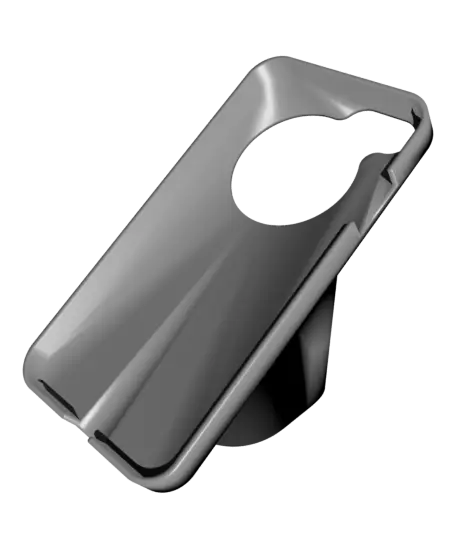
Bambu Labs P1P iPhone Holder #ThangsBambuContest
The P1P is an awesome printer, but the screen sucks! Particularly the numerous menu items you need to jump thru to do anything, not to mention the annoying inability to have a pre-set temperature button(s). The Bambu Handy app solves these issues; so if you have a spare phone (iPhone 6s, 7, 8, SE2-2
Thangs entrega los archivos a usuarios con cuenta gratuita
Licencia
Solo uso personalSin licencia indicada
El autor no indicó una licencia: todos los derechos le pertenecen. Úsalo solo para imprimir en casa y consulta al autor para cualquier otro uso.
Al descargar aceptas respetar la licencia y dar crédito a Sky-Guy.
Archivos (9)
- P1P Corner Base Plate Bolt.stl STL · 60 KB
- P1P Corner Base Plate Mount.stl STL · 1,4 MB
- P1P iPhone7 Holder - Bezel_BL Logo.stl STL · 234 KB
- P1P iPhone7 Holder - Bezel_No Logo.stl.stl STL · 219 KB
- P1P iPhone7 Holder.stl STL · 15,3 MB
- IMG_3264.jpeg JPEG
- IMG_3265.jpeg JPEG
- IMG_3266.jpeg JPEG
- IMG_3269.jpeg JPEG
- Categoría
- Para tu impresora
- Formatos
- STL, JPEG
- Descargas
- 135
- Publicado
Sobre este modelo
The P1P is an awesome printer, but the screen sucks! Particularly the numerous menu items you need to jump thru to do anything, not to mention the annoying inability to have a pre-set temperature button(s). The Bambu Handy app solves these issues; so if you have a spare phone (iPhone 6s, 7, 8, SE2-2020, SE3-2023), why not mount it to the printer as a dedicated colour touch screen?
This mount swivels too, so you can use it with your phone camera or simply add more light to the build plate with the phone's flashlight.
The base plate file should print in the “upside down” orientation and requires no supports. It is held very securely in place with a single 4M x 20mm bolt.
The base plate bolt is recommended as using a regular bolt may work loose from the vibrations. Print this simple “bolt” then self/pre-thread with your 4M bolt before assembling.
The iPhone holder should print “face down” and requires support. I HIGHLY recommend using normal(auto) supports- they remove easily and cleanly. If you use tree supports, it will still work, but the surface the phone sits against will be rougher and will cause phone to sit a tad higher making the bezel a tight fit.
The bezel should print face down as well, no supports needed. There's a version with Bambu Labs logo OR one without the logo (just plain).
Remember to go in to ‘Settings’ and disable automatic dimming as the bezel covers the sensor and will make the phone screen go rather dark if you don't adjust the screen brightness. (Settings> Accessibility> Display & Text Size>Auto-Brightness). You can then go in to Display& Brightness setting and adjust level to your liking.
You can plug the phone in to the onboard USB plug on the P1P, this USB is only powered when the P1P is powered on. This nice channel cover, by 3D Sourcerer, will help keep the USB cable neatly tucked away… https://www.printables.com/model/396083-bambu-lab-p1p-usb-cable-management-plate
If you like my design and have found it useful, please support my filament addiction- https://www.buymeacoffee.com/skyguy
Descripción original del autor, publicada en Thangs.



