
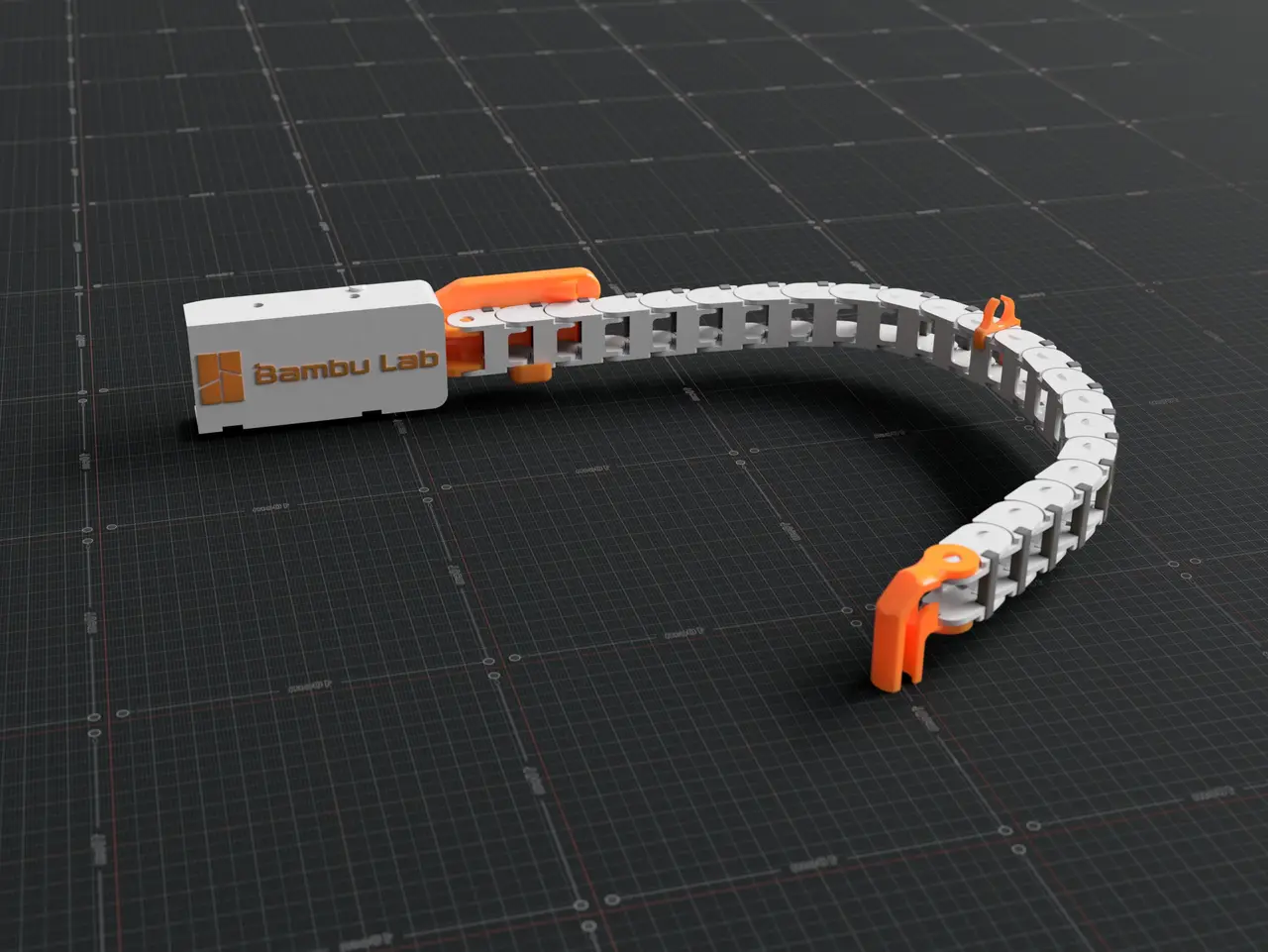
Bambu Lab P1P Cable Drag Chain Assembly - 5/9 Updated
por Brody en Printables
Designed a few parts needed to add a cable chain similar to what the X1 has.
Licencia
Solo uso personalCC BY-NC-ND 4.0 — Atribución, no comercial, sin derivadas
Solo para uso personal, sin modificarlo y dando crédito. No se permite vender ni redistribuir cambios.
Al descargar aceptas respetar la licencia y dar crédito a Brody.
Archivos (18)
- Cable_Chain_Housing_Adapter_4A.stl STL · 254 KB
- Cable_Chain_PTFE_Clip_2B.stl STL · 203 KB
- USB_Cable_Cover_3E.stl STL · 84 KB
- Cable_Chain_Frame_Adapter_Front_3C.stl STL · 356 KB
- Cable_Chain_Frame_Adapter_Rear_2D.stl STL · 139 KB
- USB_Cable_Cover_Hygrometer.3mf 3MF · 72 KB
- Cable_Chain_Frame_Adapter_Front_Inserts.stl STL · 378 KB
- Cable Chain Build Plate.3mf 3MF · 326 KB
- Cable Chain Build Plate OLD.3mf 3MF · 326 KB
- Cable_Chain_PTFE_Clip_1B OLD.stl STL · 152 KB
- Cable_Chain_Frame_Adapter_Front_2C.stl STL · 366 KB
- Cable_Chain_Housing_Adapter_3A OLD.stl STL · 170 KB
- Cable_Chain_Housing_Adapter_2A OLD.stl STL · 168 KB
- Cable_Chain_Housing_Adapter_1A OLD.stl STL · 137 KB
- USB_Cable_Cover_2E OLD.stl STL · 84 KB
- USB_Cable_Cover_1E OLD.stl STL · 84 KB
- Cable_Chain_Frame_Adapter_Front_1D OLD.stl STL · 136 KB
- Cable_Chain_Frame_Adapter_Rear_1C OLD.stl STL · 62 KB
- Categoría
- Para tu impresora
- Formatos
- STL, 3MF
- Descargas (todas las plataformas)
- 8,621
- Publicado
También en
Sobre este modelo
Bambu Lab P1P Cable Chain Assembly (1/9/2023) Designed a few parts needed to attach a cable chain, similar to the one seen on the X1. The chain helps keep the USB cable and PTFE tube completely inside the P1P, which is needed if you're going to use a covered top like the glass lid on the X1, also just like the way it looks!
Latest Update
All previous updates will be posted at the bottom. Update (5/9/2023) *Updated File - Cable_Chain_Frame_Adapter_Front_2C to 3C - Added a 2 degree incline to the chain, which should help further prevent sagging.
Files
Main Files - Cable_Chain_Frame_Adapter_Front_3C - Cable_Chain_Frame_Adapter_Rear_2D - Cable_Chain_PTFE_Clip_2B - Cable_Chain_Housing_Adapter_4A - USB_Cable_Cover_3E
Alternative Files - Cable_Chain_Frame_Adapter_Front_Inserts- Uses qty 2, 5x3 mm inserts
- USB_Cable_Cover_Hygrometer- Hygrometer - https://www.amazon.com/dp/B07GNMKYCZ?psc=1&ref=ppx_yo2ov_dt_b_product_details - Most of the Amazon ones are the same, as long as the dimensions are 1.89" x 1.13" / 48mm x 28.6mm
Print File - Cable Chain Build Plate
Additional Parts
- Qty 1 : 10x11 Cable Chain - https://www.amazon.com/dp/B07QLGWQ1L?psc=1&ref=ppx_yo2ov_dt_b_product_details- Not needed if using printable version https://www.printables.com/model/385282-bambu-lab-p1p-printable-cable-drag-chain
- Qty 6 : M3*6 (M3*4 should also work)- If using the Hygrometer, you'll only need qty 5
Print Orientation
-Picture doesn't reflect current model numbers, use the letter to identify what is what. Print Settings
DO NOT USE PLA, IT WILL BREAK. Please use PETG, ASA, PLA+ , etc. I used Polylite Pro PLA+, eSun PLA+, Overture PETG Quality - Please see build plate file.
Support - Please see build plate file.
Other - Bed adhesion - use brim if you're having adhesion issues
* To remove the supports for 4A, grab the bottom of the support that printed on the bed and pull it outwards and upwards, you'll need to use some force but it wont break anything.
Assembly
- Remove the tube anchor and PTFE tube ( I'm not using the tube anchor anymore). https://wiki.bambulab.com/en/p1/maintenance/tube-anchor-assembly https://wiki.bambulab.com/en/p1/maintenance/ptfe-tube - Remove the USB cable rubber bushing that holds the cable in place on the housing. https://wiki.bambulab.com/en/p1/maintenance/toolhead-housing - There's no actually way to remove it unless you want the cut it off so I just slid it to the other side of the cable
- 6 x M3*6
- The cable chain should be 22 links .
- Push the PTFE tube though the opening and out the back side & re-insert it back into the front housing - I have about 2in of the tube sticking out past the part.
- Insert the chain housing adapter 4A into place- Step 5 & 8 should clarify how to do this , simply press it into place . https://wiki.bambulab.com/en/x1/maintenance/replace-typec-cable - The little side brackets face outwards
- Attach the male end of the chain to 4A, open all the side brackets on the chain and put the cable in, close it up. - Snap 2B ( the clip) onto one of the chain links and push the PTFE tube in ( I have it on the 11th link) . - I purposefully left the clip wider then the tube. During some testing it definitely seemed like the tube needed to be free of constraints ( especially in back right corner of the frame). The fit is tight as the clip needs to stay in place. I clipped it on horizontally then rotated it vertically
- Lastly, attached 3E
Make sure to recalibrate after the chain is installed.
Alternative location for the hygrometer - https://www.printables.com/model/463226-bambu-lab-p1p-x1-x1c-filter-cover
If you like my designs and want to say thanks, you can buy me a coffee and help fund the filaments I need for prototyping. A donation of any amount to Buy Me a Coffee or PayPal would be greatly appreciated!
As always, given different printing environments, filaments, etc., prints may not work perfectly for everyone. If you are having issues please message or comment and I will try my best to resolve the issue.
Previous Updates
Descripción original del autor, publicada en Printables.



