
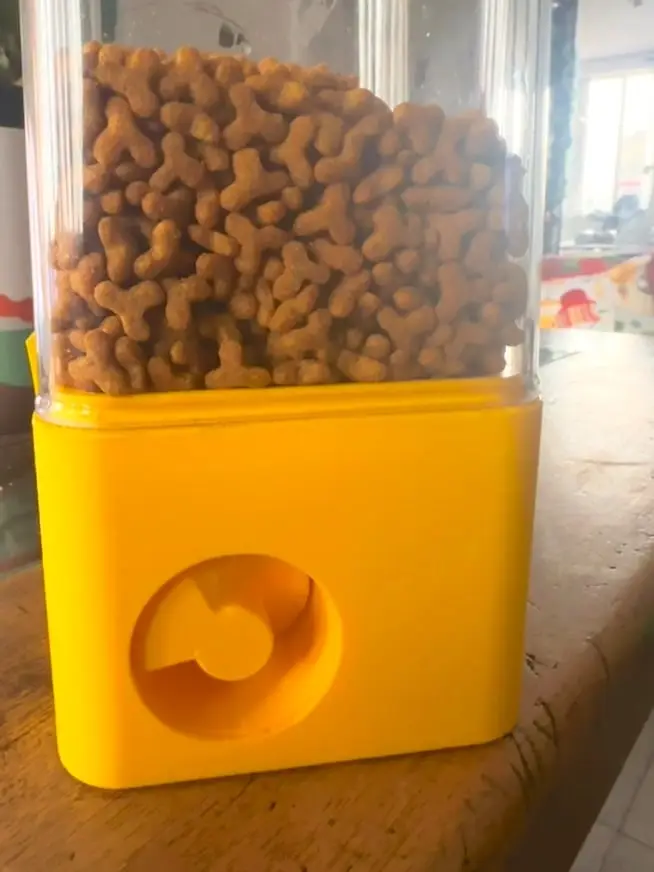
Automatic Pet Food Dispenser (3D Printed, Worm-Gear Driven Auger)
por Bryand Salamanca en Thingiverse
A motorized pet food dispenser that mounts onto an off-the-shelf clip-lock plastic container (~1.7 L / 60.5 oz, the kind sold at Dollarcity). A motor drives a worm screw, which turns a crown wheel at a reduced speed and a right angle — that crown wheel is keyed to a feed screw (auger) that pushes...
Licencia
Uso comercial permitidoCC BY-SA 4.0 — Atribución, compartir igual
Puedes usarlo y modificarlo dando crédito; las versiones modificadas deben compartirse con la misma licencia.
Al descargar aceptas respetar la licencia y dar crédito a Bryand Salamanca.
Archivos (8)
- Categoría
- Tecnología
- Formatos
- STEP, OBJ
- Descargas
- 47
- Publicado
Sobre este modelo
A motorized pet food dispenser that mounts onto an off-the-shelf clip-lock plastic container (~1.7 L / 60.5 oz, the kind sold at Dollarcity). A motor drives a worm screw, which turns a crown wheel at a reduced speed and a right angle — that crown wheel is keyed to a feed screw (auger) that pushes kibble out through the front outlet. The worm/crown mesh also keeps the auger from free-spinning when the motor is off, so food doesn't dribble out on its own. Features - Mounts onto a standard ~1.7 L (60.5 oz) clip-lock container — no custom container needed - Worm-gear driven auger: consistent portions, self-locking when idle (no gravity feed/spill) - Compact footprint: base is ~102 x 102 x 57 mm - Fully printable mechanism — only the motor and a few electronic parts are bought - Raspberry Pi Pico W controlled, so dispensing can be scheduled or triggered remotely - Editable STEP file included so you can adapt it to your own container or motor
What You Need The container - 1x clear clip-lock plastic food container, ~1.7 L / 60.5 oz (bought at Dollarcity)
Electronics - 1x Raspberry Pi Pico W development board - 1x TIP31 NPN transistor (switches the motor from the Pico W's GPIO signal) - 1x small DC gear motor, mounted to drive the worm screw - 1x 12V power adapter (powers the motor circuit)
Printed Parts PartApprox. size (mm)Description Base102 x 102 x 57Mounting shell, houses the gear train Hopper112 x 102 x 32Funnel that feeds kibble to the auger Feed screw (auger)⌀38 x 65 longPushes food toward the outlet Worm screw⌀15 x 45 longMounted on the motor shaft Crown wheel⌀33.6 x 42.5Meshes with the worm screw, drives the auger Guide47 x 53.8 x 52.8Aligns the feed screw inside the housing Washer⌀14 x 3Spacer on the drive shaft Electronics Overview The Raspberry Pi Pico W drives the TIP31's base (through a current-limiting resistor) to switch the motor on and off. The motor and TIP31's collector run off the 12V supply; the Pico W itself can be powered from its own USB/5V input, separate from the 12V motor line. Note: a flyback diode across the motor terminals is recommended to protect the TIP31 from voltage spikes when the motor switches off.
The electronics are open — build your own version however fits your setup. If you'd like the schematic or exact wiring, leave me a comment or send a DM and I'll share it. Assembly - Print all seven parts. - Mount the worm screw on the motor shaft. - Install the crown wheel and feed screw assembly into the base, meshed with the worm screw. - Fit the guide and washer on the drive shaft. - Attach the hopper on top of the base. - Secure the housing onto the container's clip-lock lid. - Wire the motor through the TIP31, controlled by the Pico W, powered from the 12V adapter. - Fill the container and test the dispensing flow.
Notes - The worm/crown reduction is what keeps the auger from free-spinning under the weight of the food — no separate anti-backdrive mechanism needed. - The container is generic and easy to replace — just reuse a cheap clip-lock storage container. - Electronics are open-ended — adapt the control circuit to whatever parts you have on hand. Need the schematic or wiring details? Comment or DM me.
Descripción original del autor, publicada en Thingiverse.



