
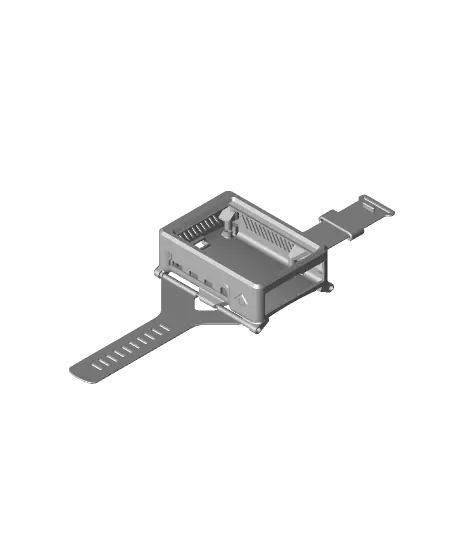
Arrow's Wrist Pi #HalloWearables
por Arrow_Raider en Thangs
You love the Raspberry Pi and wish you could take it everywhere. Behold, ~McWrist PiFace~ Arrow’s Wrist Pi. Print and assemble this model to strap the Pi directly to your arm and feel its warm embrace as the Pi converts power into waste heat. This case is provisioned for a screen which attaches dire
Thangs entrega los archivos a usuarios con cuenta gratuita
Licencia
Revisa las condicionesLICENSE
El autor usa su propia licencia. Revisa sus condiciones en la página original antes de compartir, modificar o vender.
Al descargar aceptas respetar la licencia y dar crédito a Arrow_Raider.
Archivos (7)
- assembly-arrows-wrist-pi.stl STL · 1,6 MB
- band-back.stl STL · 132 KB
- band-freeloop.stl STL · 25 KB
- band-front.stl STL · 159 KB
- bottom-wrist.stl STL · 889 KB
- middle-vented-4b.stl STL · 372 KB
- top-4b.stl STL · 56 KB
- Categoría
- Para tu impresora
- Formatos
- STL
- Descargas
- 122
- Publicado
Sobre este modelo
You love the Raspberry Pi and wish you could take it everywhere. Behold, ~McWrist PiFace~ Arrow’s Wrist Pi. Print and assemble this model to strap the Pi directly to your arm and feel its warm embrace as the Pi converts power into waste heat. This case is provisioned for a screen which attaches directly to the GPIO header for a compact fit! Gaze deep into the arrow imprinted in the side of the model and subtly be influenced by it. You _like_ this wearable. It could be because the arrow is an _upvote_, but it is more likely that you envision yourself playing _DOOM_ on your arm. Upon craning your neck trying to play, you realize it doesn’t go as well as you had hoped. But at least you have a cool gimmick to show all your friends! It may also be used on your wrist as a handy device in post-apocalyptic life.
Be sure to check out the Build Instructions (https://docs.google.com/document/d/1K6S9hRxS06tOX_H5lUoFgekfHRE6NC6L/edit?usp=sharing&ouid=108517049192670066680&rtpof=true&sd=true).
I made a really quick video (https://youtu.be/j5Tct3SgTKE) with no sound if you want to see what the final build looks like.
Bill of materials - Raspberry Pi 4 Model B - Micro SD Card - Keyboard (I use a Logitech K400 Plus) - USB power bank with 5V and 3A or more output: I use https://www.amazon.com/gp/product/B07H6LB4J4 - USB C cable - LCD display: https://www.amazon.com/gp/product/B07L1215W5 (I used and recommend rev C. Rev B should work too, but I did not test this) - 10x M2x8mm self-tapping screws: https://www.amazon.com/gp/product/B00YBMRAH4 - 2x 1mm x 77mm round rod: https://www.amazon.com/gp/product/B082ZNWQ5Q Cut to 77mm easily with a handheld rotary tool and cutting wheel. Rods greater than 77mm will not fit. 76-77mm should be fine. Check your cut rods with a caliper. Be sure to deburr your rods if necessary. - (Optional) Heatsinks for Raspberry Pi 4: https://www.amazon.com/gp/product/B07VPP642H (or similar) - (Optional) Gamepad
#HalloWearables
Descripción original del autor, publicada en Thangs.



