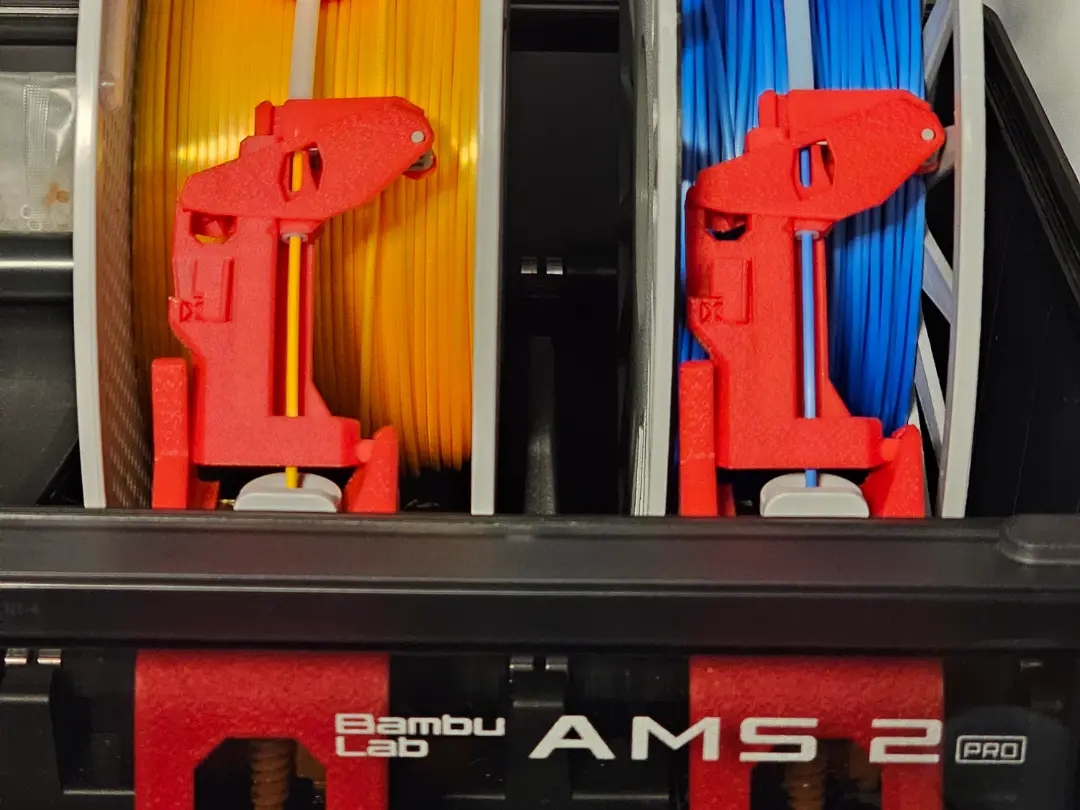
AMS 2 Pro Saver Snag Cutter V5.0
por Hexavalent en MakerWorld
Boost MeI put an unbelievable amount of lot of time and care into designing and testing this model, and your support is greatly appreciated!Major Improvements
MakerWorld entrega los archivos a usuarios con cuenta gratuita
Licencia
Solo uso personalStandard Digital File License
Licencia estándar de archivos digitales: solo uso personal. No se permite compartir, revender ni subir el archivo a otros sitios, ni vender las impresiones.
Al descargar aceptas respetar la licencia y dar crédito a Hexavalent.
- Categoría
- Para tu impresora
- Descargas
- 16,202
- Publicado
Sobre este modelo
Boost MeI put an unbelievable amount of lot of time and care into designing and testing this model, and your support is greatly appreciated!Major Improvements
The latest print profile is Version 5.0. It includes countless improvements over the previous versions. Some improvements include the following:
- Thinner and curved so the AMS lid can close with full spools.
- Easier to print with bed adhesion helpers.
- Textured for a more finished look.
- Improved tube retention features for easier assembly.
- Two user-selectable trigger forces.
- Included tube cutter jig and assembly helper.
Please only use the print profiles with the green “Designer” label. The other print profiles are not the latest version, and I have no control over them. Alternate Versions AMS Original AMS Lite Universal
makerworld.com/en/models/957400 makerworld.com/en/models/1011533 makerworld.com/en/models/1740619
What is this? This is an AMS 2 Pro Saver unlike any other. Not only does it prevent wear and tear on your AMS filament inlet, but it also prevents snags and obstructions from delaying your print!
How does it work? This AMS 2 Pro Saver differs from the other options because it has a mechanism that automatically cuts the filament if a tangle or an obstruction (taped end of the spool) is detected. This feature is turned on or off with a slider lock. Cutting the filament when a snag is detected allows the printer to automatically switch to your backup filament by setting up the Auto Refill function. If you are running a long print, this can save you hours of delayed print time! If you don't have the Auto Refill function activated, it gives you a few minutes to take action while the printer continues to use the filament in the tubes. You have a few minutes to address the issue and re-feed the filament manually for an uninterrupted print.
Process WITHOUT Cutter
- Snag is detected by the printer.
- Printer immediately pauses and the spool is retracted.
- Warning is displayed "The AMS Assist motor is overloaded. This could be due to entangled filament or a stuck spool. [0700 8010 083713].
- Printer remains paused until the issue is fixed manually
Process WITH Cutter and WITH Auto Refill enabled
- Snag is detected by the Cutter (not the printer).
- Filament is cut.
- Printer detects the end of the filament.
- Printer continues to print uninterrupted until all filament in the tubes is depleted.
- Printer switches to the refill spool automatically and continues to print.
Process WITH Cutter and WITHOUT Auto Refill enabled
- Snag is detected by the Cutter (not the printer).
- Filament is cut.
- Printer detects the end of the filament.
- Printer sends a warning message that the end of the filament has been detected and needs attention, but the print is not paused.
- Printer continues to print until all filament in the tubes is depleted (this takes a few minutes).
- Printer pauses if the tube is depleted before the issue has been fixed.
Descripción original del autor, publicada en MakerWorld.