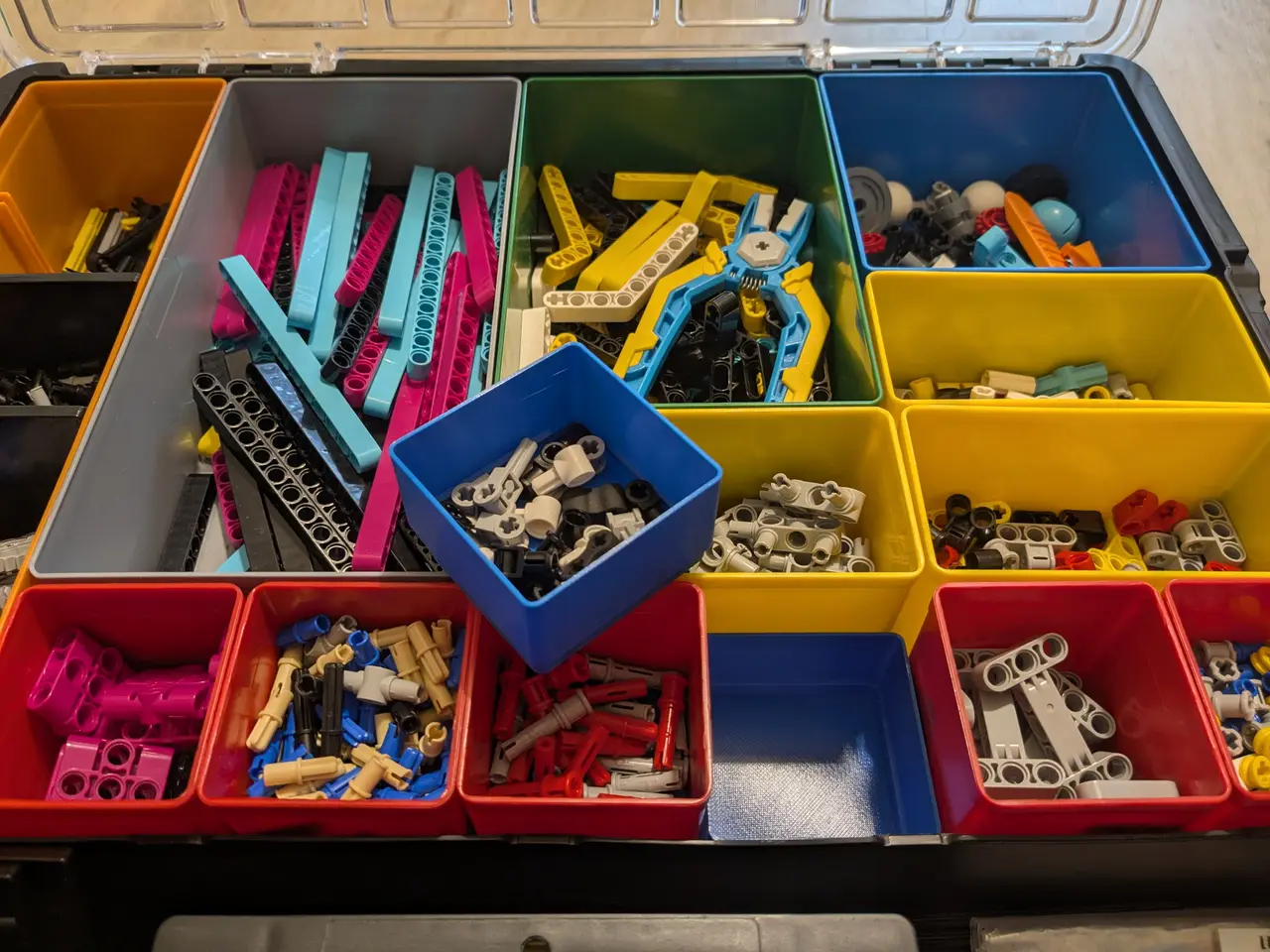
Allit EuroPlus Pro K 44/18 Half/Third/Quarter height parametric inserts / boxes
por Marek Lewandowski en Printables
Allit EuroPlus inserts with half/third/fourth height (parametric) to fit hard-case Allit cassettes. Made for LEGO parts.
Licencia
Solo uso personalCC BY-NC-ND 4.0 — Atribución, no comercial, sin derivadas
Solo para uso personal, sin modificarlo y dando crédito. No se permite vender ni redistribuir cambios.
Al descargar aceptas respetar la licencia y dar crédito a Marek Lewandowski.
Archivos (7)
- Allit EuroPlus 44_18 Insert parametric.f3d F3D · 211 KB
- Allit EuroPlus 44_18 Insert 1x1 half height.3mf 3MF · 58 KB
- Allit EuroPlus 44_18 Insert 1x2 half-height.3mf 3MF · 56 KB
- Allit EuroPlus 44_18 Insert 2x2 half height.3mf 3MF · 55 KB
- Allit EuroPlus 44_18 Insert 1x1 quarter height.3mf 3MF · 48 KB
- Allit EuroPlus 44_18 Insert 1x1 three quarter height.3mf 3MF · 62 KB
- False bottom 1x1 Allit insert box.3mf 3MF · 54 KB
- Categoría
- Organización
- Formatos
- F3D, 3MF
- Descargas
- 2
- Publicado
Sobre este modelo
While I have attached a few 3mf files, the main point of this upload is the .f3d Fusion 360 file, which is fully parametric box design for you to create any box insert for the Allit EuroPlus 44 box you might want. Model parametrization Load it into Fusion 360 and open the parameters dialog (click the fx button): Here you can define your own box insert to suit your needs: - n_x / n_y : how many units the box shall be wide/tall.
- total_vertical_slices: The denominator for fractional depths. If you want your box to be half-deep, enter '2' here. If you want your box to be 1/3 or 2/3 deep, enter '3' here. This is in how many units the height of the box will be divided.
- this_box_vertical_slices: How many units of 'total_vertical_slices' shall this box occupy. So for a box that's 2/3 deep you should enter '2' here and '3' in the field 'total_vertical_slices'. Do not enter values above 7, the boxes won't stack properly.
- base_unit_x: for all boxes EXCEPT for the leftmost column this should be 54mm. For the leftmost column, which is wider than the others, adjust this to 75mm (even if you are on imperial units, you still can enter 54mm or 75mm into the box and Fusion will convert it for you). Boxes occupying the leftmost column need to be only 1 unit wide (n_x = 1) or they won't fit. You can game the system by keeping n_x to 1 and adjusting base_unit_x to 75mm+N⋅54mm to get a box spanning the leftmost column + N regular columns though.
Considerations about height The boxes are created with a 5mm (about ¼ inch) section that slides into the box below. This means that even though a 1/8 height box will generate, it will no longer stack properly, as the total height of the box below is no longer enough to accommodate the lower part of the box above. So either keep your 'total_vertical_slices' lower than 8, or adjust 'base_h' parameter to a lower value (don't go below 3mm though). With base_h = 3mm you can have up to 10 boxes stacked, each layer will have only about 4-4.5mm vertical space, but if you are storing watch parts or small screws this is fully usable height. Feet The original boxes have small feet to prevent them from sliding around. If you want your boxes to also have feet to keep them in position you will need two things: - Roll the history marker in the model one step to the right, this will generate the feet. You will see an error for 1x1 boxes, ignore it (Fusion complains if you make a matrix of features that's 1x1 big, but the feet generate properly, just ignore the error message)
- Enable supports on build plate. The print time will increase and the bottoms of the boxes won't be as pretty, but they will not slide around.
False bottom I have attached one extra file, 'False bottom 1x1 Allit insert box.3mf', which can be used with original inserts to effectively halve their depth. This is a faster print than a full box and can be used to divide an insert into 'available' and 'backup' part, e.g. putting a few fuses under the false bottom and the rest on top, so that refill is ordered when the box goes empty, but there's a secret stash underneath. The false bottom fits original boxes perfectly, but is a loose fit in the 3d printed ones (you can scale it up in xy to 102% and it should become a close fit)
Descripción original del autor, publicada en Printables.