
Advanced Flow Calibration Test - Kalibrierung des Flusses
por CL Performance en Printables
If you like to have a very accurate Flow, try this sample. No measurements needed!
Licencia
Uso comercial permitidoPuedes imprimirlo, modificarlo y venderlo dando crédito al autor.
Al descargar aceptas respetar la licencia y dar crédito a CL Performance.
Archivos (5)
- Categoría
- Para tu impresora
- Formatos
- STL
- Descargas
- 7,189
- Publicado
Sobre este modelo
English below! Eine fortschrittliche Methode zur Überprüfung der Durchflussgenauigkeit Hinweis: Es ist absolut richtig, dass die STL aus 2 Teilen besteht! Bitte einfach den Anweisungen folgen. die Kurzanleitung zu dieser Vorgehensweise findest Du in diesem Video: Wie du den Flow kalibrierst: Step 1: - aktiviere den Support - Linienstärke = Düsendurchmesser - Wandstärke: 0 (dies deaktiviert die variable Linienbreite) - Anzahl der Wandlinien: 1 - Füllung: 100%
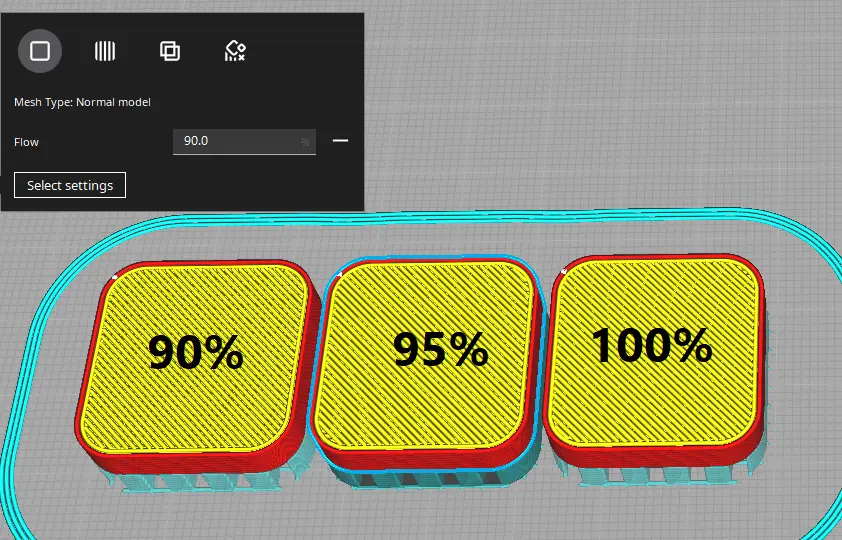
Step 2: - Füge 2 weitere Teile zu deiner Bauplatte hinzu - aktiviere "pro Modell Einstellung" - wähle "Durchfluss" als Variable - wähle für das 1. Modell 90%, für das zweite Modell 95%, und 100% für das letzte als Referenz
Beurteile nach dem Druck die oberste Schicht: - Wenn Lücken zwischen den Linien auf der obersten Hautschicht sind, ist der Fluss zu gering. - Wenn die Oberfläche rau ist, ist der Flow zu viel. - Wenn die Oberfläche schön glatt ist, ist der richtige Fluss für das aktuelle Material gefunden.
Cura Settings:
Wenn du mir eine kleine Spende zukommen lassen möchtest, dann kannst du das hier gerne tun, ohne einen Account zu erstellen: An CL Performance Spenden
English: An Advanced way to check the flow accuracy Note: it is absolutely correct, that both parts of this test has no connection! Please follow the instructions. How to dail in your flow: 1st: - enable Supports - Linewidth = Nozzle diameter - Wall Thickness 0 (this disables the variable line width) - Wall Line Count: 1 - Infill: 100%
2nd: - Add 2 more parts to your build plate - activate “per model setting” - choose “flow” as your variable - for the first test, choose 90% for the 1st model, 95% for the 2nd and 100% for the last as reference
After printing judge the top-layer: - if you have gaps between the lines at the top skin layer, your flow is too low - if the surface is rough, your flow is too high - if your skin is nice ans smooth, you found the correct flow for your material
This is a remix of CNC Kitchen's Extrusion test modle which can be found on thingiverse.
Descripción original del autor, publicada en Printables.



