
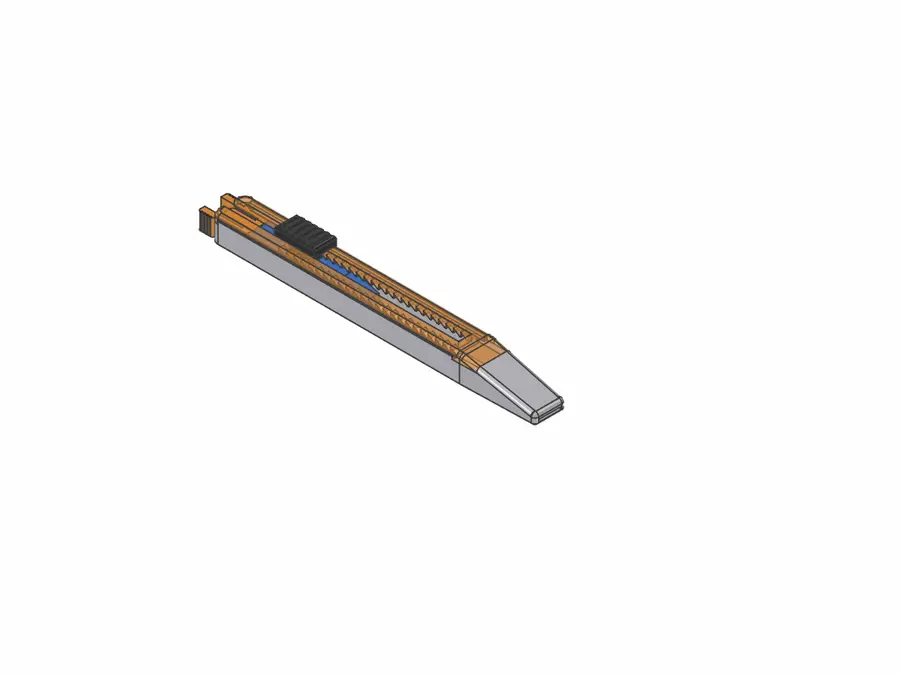
9 mm Snap-Off Utility Knife – Ratchet Lock, Parametric (FreeCAD)
por François BORDAS en Printables
Cutter for 9 mm snap-off blades: ratchet lock, push-button release, pinch-off rear plug. 2-part or one-piece shell.
Licencia
Uso comercial permitidoPuedes imprimirlo, modificarlo y venderlo sin pedir permiso ni dar crédito.
Al descargar aceptas respetar la licencia y dar crédito a François BORDAS.
Archivos (17)
- Cutter_assemblage.step STEP · 550 KB
- Bouchon_Arriere.step STEP · 77 KB
- Bouton.step STEP · 63 KB
- Chariot.step STEP · 27 KB
- Coque_Bas.step STEP · 81 KB
- Coque_Unie.step STEP · 396 KB
- Coque_Haut.step STEP · 283 KB
- Coque_Unie_Zebre.step STEP · 627 KB
- Bouton.3mf 3MF · 12 KB
- Chariot.3mf 3MF · 8 KB
- Bouchon_Arriere.3mf 3MF · 10 KB
- Coque_Unie.3mf 3MF · 106 KB
- Coque_Haut.3mf 3MF · 68 KB
- Coque_Bas.3mf 3MF · 44 KB
- Coque_Unie_Zebre.3mf 3MF · 200 KB
- Cutter.fcstd FCSTD · 591 KB
- Cutter_oriented.3mf 3MF · 255 KB
- Categoría
- Herramientas
- Formatos
- STEP, 3MF, FCSTD
- Descargas
- 0
- Publicado
Sobre este modelo
A printable cutter for standard 9 mm snap-off blades Utility knife handle for standard 9 mm snap-off blades (30°). The blade is locked by a sawtooth ratchet: push the button forward and it clicks out notch by notch; the cutting force can't push the blade back. Press the button down to release it and retract the blade. - 20 notches of 3 mm: up to 60 mm of blade out, and the blade hides completely inside the nose when retracted
- Integrated spring in the carrier: no metal spring, no screw
- Pinch-to-remove rear plug: squeeze the two ears to pull it out and change the blade
- Handle: 129.6 × 13.9 × 11.2 mm
3 possible shells - One-piece "zebra" shell (Coque_Unie_Zebre) – the tested version, shown in the photos. Printed in one go, upside down (top face on the bed), with 45° filleted windows through the floor. The carrier and the button slide in from the rear.
- One-piece plain shell (Coque_Unie): same as the zebra shell, without the windows.
- 2-part shell to glue (Coque_Bas + Coque_Haut): bottom and top shells located by a lip/rebate joint. Not tested.
Parts - One shell: Coque_Unie_Zebre (tested) or Coque_Unie or Coque_Bas + Coque_Haut
- Chariot (blade carrier with built-in spring)
- Bouton (push button)
- Bouchon_Arriere (rear plug)
- One standard 9 mm snap-off blade
Printing - Printed and tested in PLA on a Bambu Lab A1 mini, 0.4 mm nozzle, 0.2 mm layers.
- Cutter_oriented.3mf contains all the parts with the orientation I used for a good print with the zebra shell: just open it and slice.
- The individual 3MF files are oriented too: carrier and button on their side (the spring and the teeth flex in the layer plane), plug flat, one-piece shells upside down.
- No supports needed for the carrier, button and plug.
- A little sanding may be needed to fine-tune the clearances and get parts that fit perfectly into each other (mainly the carrier sides and the button), depending on your printer.
Assembly - Put the blade on the carrier pin (the hole edge is 2 mm from the cutting edge).
- Fit the button foot into the carrier window, above the spring.
- One-piece shell: slide the carrier and the button in from the rear, button pressed. 2-part shell: lay the carrier in the bottom shell, then close and glue the top shell.
- Clip the rear plug in: pinch the ears, push, release.
Files - Cutter-oriented.3mf: all parts, oriented for printing (zebra shell).
- 3MF (oriented) and STEP (assembly position) for every part, plus a full assembly STEP.
- FreeCAD file: the model was generated by a parametric Python script driven by a "Parameters" spreadsheet (clearances, wall thickness, number of notches, spring size, blade dimensions…).
Safety This holds a real, very sharp blade. Always retract the blade after use, check that the lock holds before cutting, and keep it away from children. Use at your own risk. Designed with FreeCAD; the parametric script was developed with the help of an AI assistant.
Descripción original del autor, publicada en Printables.



