
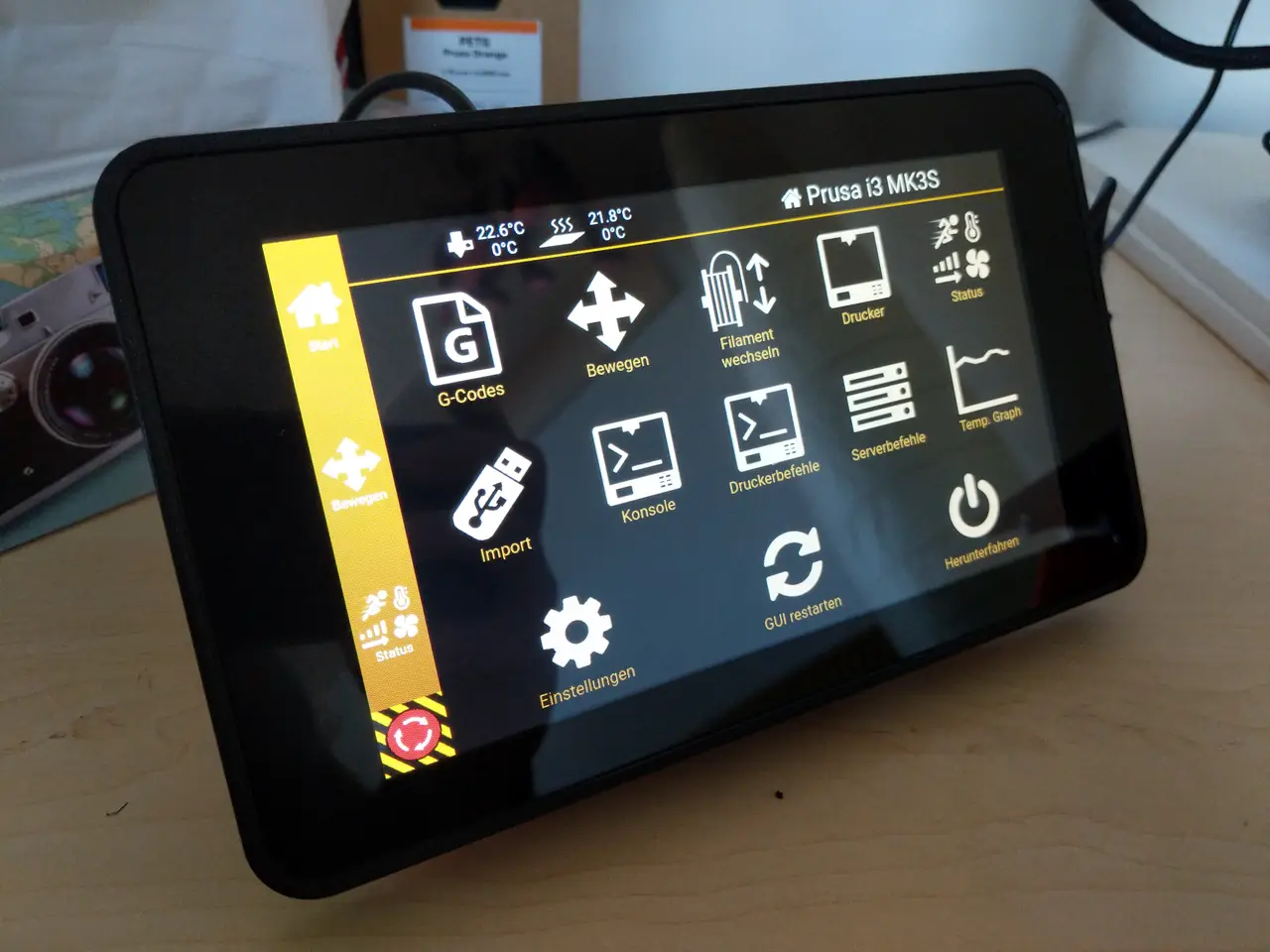
7" Touchscreen case for Raspberry Pi 4 + internal fan
por RonnyS en Printables
Case for Raspberry Pi 7" Touchscreen and Raspberry Pi 4 Features Internal fan mount (40mm x 40mm x10) Thread inserts…
Licencia
Uso comercial permitidoPuedes imprimirlo, modificarlo y venderlo dando crédito al autor.
Al descargar aceptas respetar la licencia y dar crédito a RonnyS.
Archivos (21)
- rpi4-case-top_v2.3mf 3MF · 366 KB
- rpi4-case-top_v2.stl STL · 1,5 MB
- rpi4-case_asm_v2.stp STP · 2,2 MB
- rpi4-case_asm.stp STP · 2,1 MB
- rpi4-display-case.3mf 3MF · 77 KB
- rpi4-case-bottom.3mf 3MF · 98 KB
- rpi4-case-top.3mf 3MF · 267 KB
- rpi4-stand.3mf 3MF · 125 KB
- rpi4-fanmount.3mf 3MF · 71 KB
- rpi4-display-case.stl STL · 183 KB
- rpi4-case-bottom.stl STL · 247 KB
- rpi4-case-top.stl STL · 1,0 MB
- rpi4-stand-right.stl STL · 141 KB
- rpi4-stand-left.stl STL · 141 KB
- rpi4-fanmount.stl STL · 147 KB
- rpi4-display-case_02mm_petg_mk3s_4h51m.gcode GCODE · 5,0 MB
- rpi4-case-bottom_02mm_petg_mk3s_2h6m.gcode GCODE · 3,4 MB
- rpi4-case-top_02mm_petg_mk3s_4h2m.gcode GCODE · 8,5 MB
- rpi4-stand_02mm_petg_mk3s_2h51m.gcode GCODE · 4,9 MB
- rpi4-fanmount_02mm_petg_mk3s_29m.gcode GCODE · 1,0 MB
- rpi4-case-top_v2_0.2mm_PETG_MK3S_4h7m.gcode GCODE · 7,7 MB
- Categoría
- Tecnología
- Formatos
- 3MF, STL, STP, GCODE
- Descargas
- 3,753
- Publicado
Sobre este modelo
Case for Raspberry Pi 7" Touchscreen and Raspberry Pi 4 *** New case for Raspberry Pi Touch Display 2 *** Updates - Alternative top case part with additional slot for camera ribbon cable, see subfolder "case top v2".
Features - Internal fan mount (40mm x 40mm x10) - Thread inserts (pi case)
Alternative mounting brackets: - Plate mounting bracket for 7" touchscreen case - V-Slot profile 2020 mounting bracket for 7" touchscreen case
Required parts - Raspberry Pi 4B - Raspberry Pi 7-Inch Touch Screen Display - Fan 40x40x10, 5V → Noctua NF-A4x10 5V incl. anti-vibration mounts - 4x Anti-vibration mounts (See fan) - 2x 1P Single Dupont connectors (For fan)
Mount Raspberry Pi case (top / botton parts) - 4x M3 thread inserts → Ruthex RX-M3x5.7 - 4x Cylindrical head screw M3 x 12mm
Mount Raspberry Pi case (display / stands / botton parts) - 4x Cylindrical head screw M3 x 12mm
Mount Raspberry Pi / fan - 4x Cylindrical head screw M2.5 x 16mm
Print instructions Supports: No Pi image configuration In the config.txt the screen orientation must be rotated. lcd_rotate=2 Building instruction - Install the threaded inserts in the bottom part of the case.
- Install the data cable (ribbon cable) and power (red/black wires) with the touch screen controller card. See Raspberry Pi - Documentation -> Physical Installation - Assemble the touch screen, display case, bottom case and strands with M3x12mm screws. Attention do not tighten the screws yet! - Place the Raspberry in the case. Do not forget the SD card with image! - Connect the Raspberry with the touch screen. - Data cable - Red wire (+): 5V power pin e.g. GPIO 2 - Black wire (-): Ground pin e.g. GPIO 9
- Install the fan on the fanmount with 4 anti-vibration mounts. - Install the fanmount on the Raspberry with M2.5 x 16mm screws. Tighten the screws.
- Tighten the loose M3 x 12mm screws. (See Point 3) - Connect the fan with the Raspberry. - Red wire (+): 100% fan speed -> 5V power pin e.g. GPIO 4 or reduced fan speed -> 3V3 power pin e.g. GPIO 17 - Black wire (-): Ground pin e.g. GPIO 6
- Install the top part onto the bottom part using M3 x 12mm screws.
Descripción original del autor, publicada en Printables.



