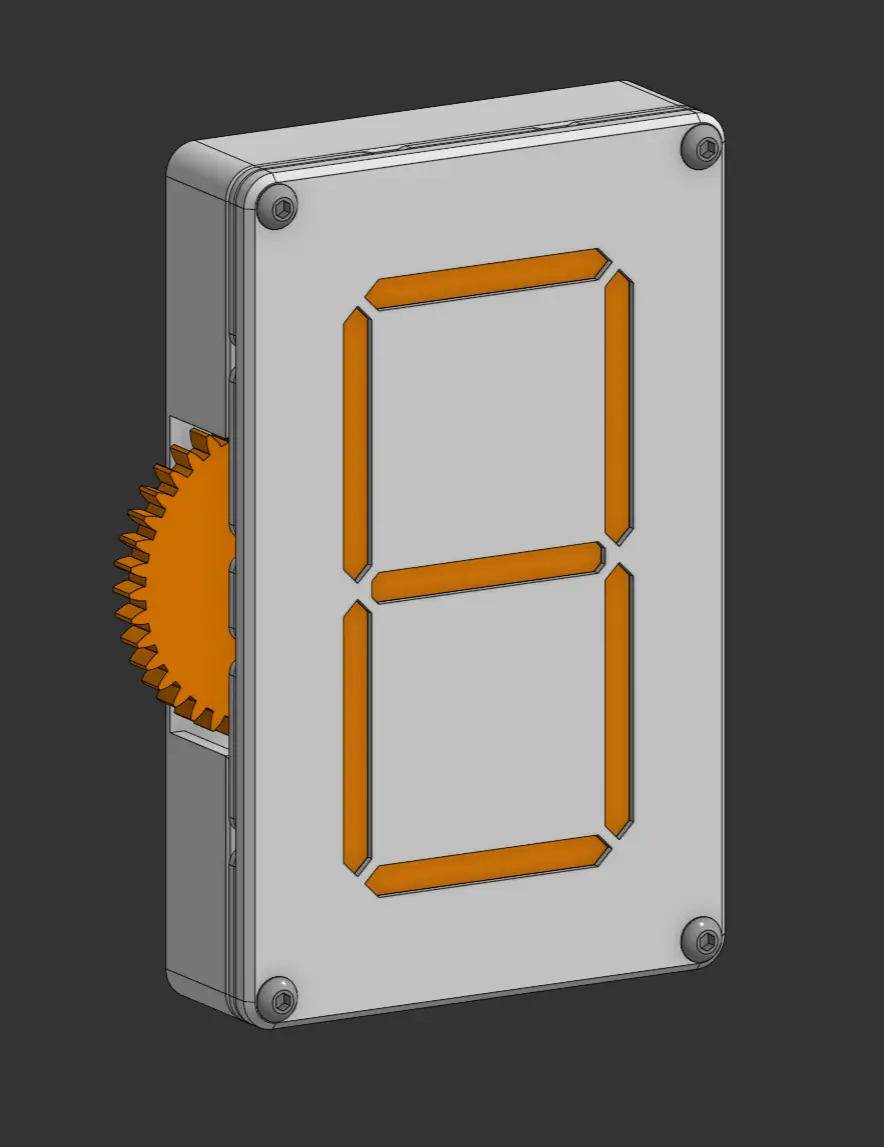
7-Segment Display
por Alex en Printables
A gear side driven model with a sliding segment design.
Licencia
Uso comercial permitidoPuedes imprimirlo, modificarlo y venderlo sin pedir permiso ni dar crédito.
Al descargar aceptas respetar la licencia y dar crédito a Alex.
Archivos (45)
- New - Cam (1).step STEP · 44 KB
- New - Cam (2).step STEP · 68 KB
- New - Cam (3).step STEP · 80 KB
- New - Cam (4).step STEP · 56 KB
- New - Cam (5).step STEP · 56 KB
- New - Cam (6).step STEP · 56 KB
- New - Cam.step STEP · 44 KB
- New - Front.step STEP · 93 KB
- New - Plate.step STEP · 496 KB
- New - Segment (1).step STEP · 45 KB
- New - Segment (2).step STEP · 43 KB
- New - Segment (3).step STEP · 45 KB
- New - Segment (4).step STEP · 45 KB
- New - Segment (5).step STEP · 45 KB
- New - Segment (6).step STEP · 57 KB
- New - Segment.step STEP · 45 KB
- New - Shaft.step STEP · 63 KB
- New - Shell.step STEP · 88 KB
- New - Spacer (2).step STEP · 61 KB
- New - Spacer.step STEP · 61 KB
- New - Spur 1M 18T.step STEP · 235 KB
- New - Spur 1M 40T.step STEP · 472 KB
- bottomShell.stl STL · 483 KB
- cam.stl STL · 61 KB
- cam.stl STL · 47 KB
- cam.stl STL · 61 KB
- cam.stl STL · 47 KB
- cam.stl STL · 61 KB
- cam.stl STL · 76 KB
- cam.stl STL · 90 KB
- driverGear.stl STL · 255 KB
- front.stl STL · 206 KB
- gear.stl STL · 137 KB
- mainFrame.stl STL · 2,4 MB
- middle segment.stl STL · 36 KB
- segment1.stl STL · 34 KB
- segment1.stl STL · 34 KB
- segment2.stl STL · 33 KB
- segment2.stl STL · 34 KB
- segment3.stl STL · 34 KB
- sement3.stl STL · 34 KB
- shaft.stl STL · 105 KB
- shortSpacer.stl STL · 63 KB
- spacer.stl STL · 63 KB
- AssemblyV7.step STEP · 2,3 MB
- Categoría
- Repuestos
- Formatos
- STEP, STL
- Descargas
- 65
- Publicado
Sobre este modelo
7 - Segment Display This is a near fully 3d printed design of a 7 segment display, completely hand powered. Motivation: I had always seem 7 segment displays and thought they were cool, I wanted to challenge myself to make one as well. Printing The special segment with a notch in its bottom will need to be printed with supports, other than that, no other parts require support material. Assembly Step 1 Begin the assembly process by getting the special middle segment, and slot it into the middle slots through the cutout. | | | | Step 2 Then take the other pieces, match their heights and slide them through the slots in the plate. | | | | | | | | Step 3 Use 2 rubber bands to keep the segments in tension and pressed to the center of the rotation points. Make sure that the center segment is properly held by the rubber bands, it should be pushed by the lower rubber band in a sort of reverse fashion compared to the others. | | | | | Step 4 Screw in the shafts, they use M3 screws, and button heads to keep a low profile. Make sure not to tighten the screws too tight so that it still spins freely. | | | | | | Step 5 Organize and align all of cams in the proper order Step 6 Slide the cams onto the shafts as expected. They are in the order, starting from the top shaft, A, B, G, F, then the bottom shaft is; spacer, C, D, E. Make sure the arrows on the cams are pointing towards the segment they are directed for. The cams should all be set up for the 0 position at the start.
Reference: The name for each segment is standardized to common conventions, make sure not to reverse it when looking from the back. | | | Step 7 Slide the gears onto the corresponding positions, the larger gear spins freely on the built in pin. The smaller gears are attached to the shafts. Make sure the 2 shafts are aligned to the same angle when you mesh the larger gear. | | | | | | Step 8 Screw in the shell for the main housing. Align the pin that holds the larger gear, and the 3 shafts. You will likely need to have another allen key / screwdriver in the other side of the shaft to hold it and stop it from spinning in place while screwing in the screws on the other side. | | | | | | | | | Step 9 Screw in the final front panel, this panel covers the internals so that the display is actually readable, as the segments now move behind it when sliding. | This is the final step, test it out by spinning the gear on the side. If you are experiencing trouble spinning it, make sure that: All your cams are oriented properly You are spinning the gear in the right direction If necessary, your cams are lubricated to reduce friction.
Descripción original del autor, publicada en Printables.