
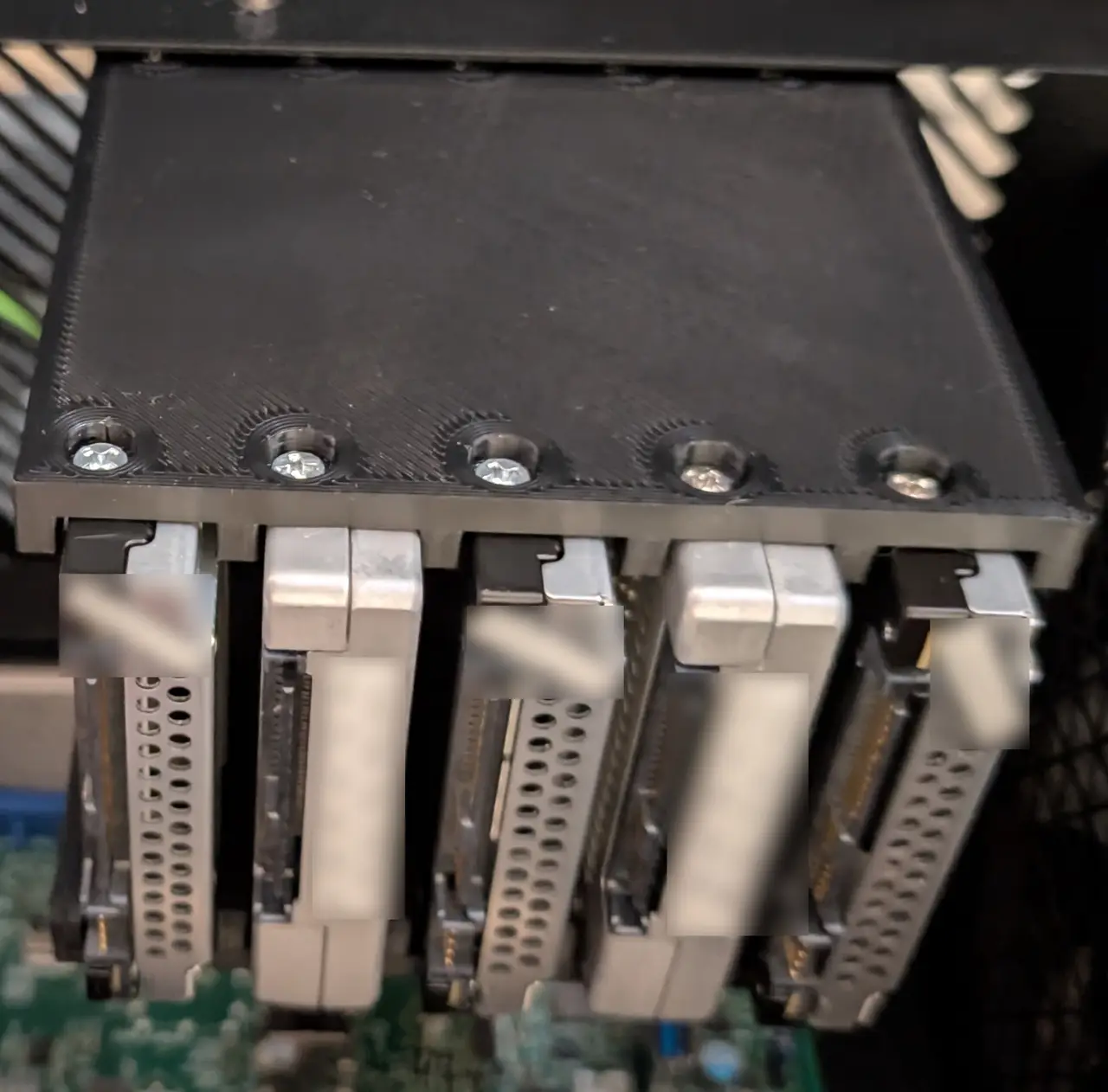
45Drives HL15 15mm SSD (U.2) Mount
por 1beerbaron en Printables
Mount various quantities of 15mm SSDs (U.2) in the HL15 near the PSU
Licencia
Uso comercial permitidoPuedes imprimirlo, modificarlo y venderlo dando crédito al autor.
Al descargar aceptas respetar la licencia y dar crédito a 1beerbaron.
Archivos (48)
- Perpendicular_M3.step STEP · 113 KB
- Perpendicular_M3_Mirrored.step STEP · 113 KB
- Perpendicular_M3_NoPocket.step STEP · 110 KB
- Perpendicular_M3_NoPocket_Mirrored.step STEP · 110 KB
- Perpendicular_6-32.step STEP · 110 KB
- Perpendicular_6-32_Mirrored.step STEP · 110 KB
- Parallel_2Drives_M3.step STEP · 46 KB
- Parallel_2Drives_M3_Mirrored.step STEP · 46 KB
- Parallel_2Drives_M3_NoPocket.step STEP · 43 KB
- Parallel_2Drives_M3_NoPocket_Mirrored.step STEP · 43 KB
- Parallel_2Drives_6-32.step STEP · 43 KB
- Parallel_2Drives_6-32_Mirrored.step STEP · 43 KB
- Parallel_3Drives_M3.step STEP · 59 KB
- Parallel_3Drives_M3_Mirrored.step STEP · 59 KB
- Parallel_3Drives_M3_NoPocket.step STEP · 56 KB
- Parallel_3Drives_M3_NoPocket_Mirrored.step STEP · 56 KB
- Parallel_3Drives_6-32.step STEP · 56 KB
- Parallel_3Drives_6-32_Mirrored.step STEP · 56 KB
- Parallel_4Drives_M3.step STEP · 73 KB
- Parallel_4Drives_M3_Mirrored.step STEP · 73 KB
- Parallel_4Drives_M3_NoPocket.step STEP · 70 KB
- Parallel_4Drives_M3_NoPocket_Mirrored.step STEP · 70 KB
- Parallel_4Drives_6-32.step STEP · 70 KB
- Parallel_4Drives_6-32_Mirrored.step STEP · 70 KB
- Parallel_4Drives_M3_NonSquareDividers.step STEP · 76 KB
- Parallel_4Drives_M3_NonSquareDividers_Mirrored.step STEP · 76 KB
- Parallel_4Drives_M3_NoPocket_NonSquareDividers.step STEP · 70 KB
- Parallel_4Drives_M3_NoPocket_NonSquareDividers_Mirrored.step STEP · 70 KB
- Parallel_4Drives_6-32_NonSquareDividers.step STEP · 70 KB
- Parallel_4Drives_6-32_NonSquareDividers_Mirrored.step STEP · 70 KB
- Parallel_5Drives_M3.step STEP · 80 KB
- Parallel_5Drives_M3_Mirrored.step STEP · 80 KB
- Parallel_5Drives_M3_NoPocket.step STEP · 77 KB
- Parallel_5Drives_M3_NoPocket_Mirrored.step STEP · 77 KB
- Parallel_5Drives_6-32.step STEP · 77 KB
- Parallel_5Drives_6-32_Mirrored.step STEP · 77 KB
- Parallel_6Drives_M3.step STEP · 95 KB
- Parallel_6Drives_M3_Mirrored.step STEP · 95 KB
- Parallel_6Drives_M3_NoPocket.step STEP · 92 KB
- Parallel_6Drives_M3_NoPocket_Mirrored.step STEP · 92 KB
- Parallel_6Drives_6-32.step STEP · 92 KB
- Parallel_6Drives_6-32_Mirrored.step STEP · 92 KB
- Parallel_6Drives_M3_NonSquareDividers.step STEP · 97 KB
- Parallel_6Drives_M3_NonSquareDividers_Mirrored.step STEP · 97 KB
- Parallel_6Drives_M3_NoPocket_NonSquareDividers.step STEP · 91 KB
- Parallel_6Drives_M3_NoPocket_NonSquareDividers_Mirrored.step STEP · 91 KB
- Parallel_6Drives_6-32_NonSquareDividers.step STEP · 91 KB
- Parallel_6Drives_6-32_NonSquareDividers_Mirrored.step STEP · 91 KB
- Categoría
- Tecnología
- Formatos
- STEP
- Descargas
- 1
- Publicado
Sobre este modelo
I wanted to add additional U.2 SSDs and could not find an existing model that was what I wanted. Designed from scratch using the 45Drives model as a reference. I've attached all step files. Parallel vs Perpendicular is referencing airflow through the case. So Parallel would have the drives be mounted front to back. I also increased the thickness of the dividers to allow for better airflow around the drives, as they will likely get hotter than SATA SSDs and it's not like a few extra mm hurt anything. (The picture of the perpendicular version does have more narrow dividers. I did not want to reprint it just for a picture.)
Print Quantities/Mirrored "Mirrored" is not truly mirrored. It is actually changing which side of the slot the screw holes are closest to. Perpendicular Print 2 of the same model. You can swap the orientation of the cables by simply rotating 180 degrees. I added the mirrored option in case anyone would want it. It should not really be needed as all it would do is swap if the top of the drives face the front or back, but it was simple enough so I figured why not. Parallel Print one normal and one mirrored of whichever version you pick.
Heat-set inserts I used CNC Kitchen's M3x3 (short version) heat-set inserts. The model I used is designed so that a hole big enough for the M3 screw can go all the way through but the larger diameter portion does not so that there is a sort of pocket for it. I also included versions without the pocket ("NoPocket") and using 6-32 inserts (same dimensions the original 45Labs model uses). If someone needs different sizes and is not able to do so themselves I should be able to do so relatively easily.
Details/Descriptions Perpendicular Models are setup for 5 drives. Each drive bay is a separate part in the step file. So removing bays should be as simple as deleting the part in your slicer. Along with that you should be able to add additional bays by simply duplicating a bay and getting the coordinates correct. I printed this and can confirm fit but then decided to use the parallel version.
Parallel Have each option with anywhere from 2-6 drive bays. On the 4 and 6 drive bay versions the holes for the heat-set inserts have some overlap with the dividers. So I did uploaded two, additional sub-versions of them. The "normal" ones simply have the dividers as is so they cover up some of the end of the holes. The "NonSquareDividers" versions have the heat-set insert hole extend all the way out so there is part of a circle missing out of the top of those 2 dividers. I honestly do not see a reason to use the NonSquareDividers version outside of aesthetics. It should be worse for printing. But I used the 5 drive version and that was the extent of what I was willing to put effort into for not having the dividers just end with the edge covering up part of the holes.
Descripción original del autor, publicada en Printables.



